 Managed IT Services
Top 5 Reasons Why SMBs Must Rethink of Hiring an In-house IT Team for their Network Infrastructure



Downtime Draining Your Business? Fix It Before It Costs More
Missed alerts turn into outages, outages turn into lost revenue. ExterNetworks Inc. delivers 24/7 NOC & Help Desk support to keep everything running smoothly.
Get 24/7 IT Support NowHiring an in-house IT team may seem like the natural next step when your business needs more technical support. Dedicated employees can develop a strong understanding of your systems, work closely with your staff, and respond to issues that require physical attention. Before recruiting, however, identify whether your main gap is on-site availability, specialist expertise, ongoing maintenance, or support coverage.
An internal hire is one option. A managed service provider (MSP), or a combination of internal and external support, may also address those needs. The right approach depends on your workload, budget, technical requirements, and the responsibilities you want to retain within your organization.
Below, we explain when hiring internally may make sense and what to compare before choosing between an in-house IT team and a managed services partner.
When Should You Consider Hiring an In-House IT Team?
Businesses should consider hiring an in-house IT team when they require regular on-site technical support, dedicated management of internal systems, and employees who understand their specific business operations. An internal IT team can provide direct control over technology decisions and respond to recurring technical requirements. However, the decision should depend on the organization’s workload, infrastructure complexity, and long-term support needs.
Do You Need Frequent Hands-On Support?
If your employees regularly need physical assistance with computers, servers, network equipment, printers, or office connectivity, hiring an in-house IT professional may be a practical option. An on-site employee can troubleshoot hardware problems, configure devices, support new employee setups, and address technical issues that require physical access.
For businesses with multiple offices, large workforces, or equipment that requires regular maintenance, dedicated on-site IT support can reduce delays and keep daily operations running smoothly.
Do Your Systems Require Detailed Business Knowledge?
Businesses using specialized applications, customized infrastructure, or complex internal workflows may benefit from an IT professional who develops a deeper understanding of their technology environment.
An in-house employee can become familiar with internal systems, departmental requirements, access policies, and business processes. This knowledge can help when troubleshooting recurring issues, supporting application changes, and coordinating technology requirements across departments.
Do You Need Someone to Own IT Priorities?
Consider hiring an internal IT professional when your business needs someone to own technology planning, infrastructure decisions, vendor coordination, and ongoing IT requirements.
An in-house IT employee can work directly with management and different departments to prioritize technical projects, coordinate system upgrades, manage user access, and oversee technology-related activities. This is particularly useful when IT decisions need frequent communication with business teams.
Is There Enough Ongoing Work for a Permanent Role?
Before hiring, evaluate whether your business has enough recurring IT responsibilities to justify a full-time employee. Consider the volume of support requests, infrastructure maintenance, security tasks, employee onboarding, system administration, and ongoing technology projects.
If these responsibilities require consistent attention throughout the working week, a permanent IT role may be justified. However, if technical requirements are occasional or vary significantly, hiring a full-time employee may create unnecessary employment costs.
The key is to match the hiring decision to your actual IT workload. Businesses should assess their ongoing responsibilities, required technical skills, and support expectations before deciding whether to build an internal team or use external IT support.
In House IT Team vs Experienced Managed Service Partner
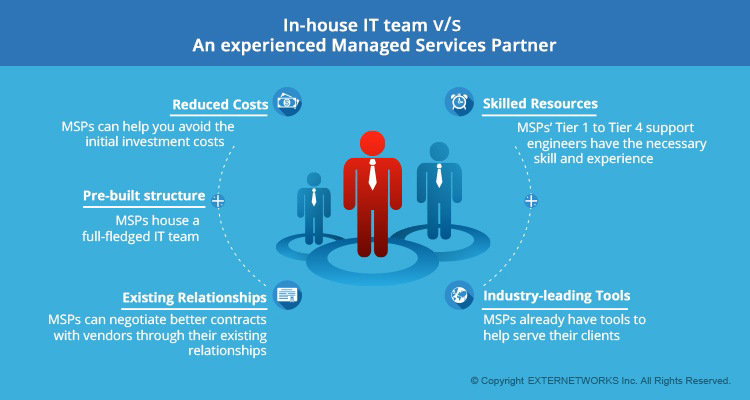
In-House IT Team v/s An experienced Managed Services partner
- Pre-built structure: A well-run managed service provider has the necessary structure of a full-fledged IT team. This means that they have tried and tested every single process. They have a systematic approach to the onboarding process to ensure that their clients are serviced efficiently regardless of which technician is servicing the user.
- Industry-leading Tools: Amongst the other aspects of having an in-house IT department, using industry-leading tools is very expensive. MSPs have already invested heavily in these tools to monitor applications, create tickets, manage your systems, and resolve incidents before they become a crisis. This ensures that their SMB clients can have the advantage of IT operations that allows these clients to compete at the enterprise-grade.
- Reduced Costs: The tools mentioned above can cost upwards of a few hundred thousand dollars. You can avoid making the initial capital investment, which is huge for an SMB. Also, with experienced and efficient IT support technicians, you can save a lot of money in training and productivity. You can avoid the cost of having to pay for someone to hang around until an issue comes up.
- Existing Relationships: MSPs work with industry-specific vendors all day long and have existing relationships with them. This means they can often negotiate better contract terms, push through orders faster, and provide a closer point of contact when issues arise. As a single organization, you may not have the same leverage, regardless of your previous contracts with them.
- Skilled Resources: The most important element of an IT department is the experience and skills it brings. From Tier 1 to Tier 4 support engineers, MSPS’s resources gain tremendous exposure through a multitude of customer issues on a day-to-day basis, learning new security risks and identifying issues before they occur. MSP IT staff keep their skills honed and are often more competent than the average in-house technician because of the scope of their work. They can share knowledge across the team and stay regularly trained.
More often than not, your staff may have to do the balancing act of managing ongoing user issues and your organization’s last-minute needs, but there is no doubt that outsourcing to an MSP is more beneficial than having an independent in-house team. It may feel safer to stick with what we know than to face the unknown. Quite often, we hear clients say they need an additional onsite technician or a network administrator, but what they need is just a little more from their Managed Services Provider.
What Are the Challenges of Hiring an In-House IT Team?
Hiring an in-house IT team gives businesses direct control over their technology operations, but it also involves ongoing costs, staffing responsibilities, and resource management. Organizations must consider whether they have enough work to justify permanent employees and whether their internal team can cover all technical requirements.
Some common challenges include:
1. Higher Recruitment and Employment Costs
Hiring IT professionals involves more than paying salaries. Businesses may also need to budget for recruitment, employee benefits, onboarding, training, and ongoing professional development. These expenses can increase the overall cost of maintaining an internal IT team.
2. Limited Access to Specialized Expertise
A small in-house team may not have the expertise to manage every area of IT, such as network security, cloud infrastructure, server administration, and advanced troubleshooting. Businesses may need additional employees or external specialists to address these requirements.
3. Limited Support Availability
Internal IT employees generally work within defined schedules. When an employee is unavailable due to leave, illness, or other responsibilities, support coverage may suffer. Providing after-hours or round-the-clock assistance may require additional staff.
4. Ongoing Training and Technology Investments
IT environments continue to evolve, requiring employees to update their technical knowledge and skills. Businesses may also need to invest in monitoring platforms, ticketing systems, security tools, and other management technologies to support internal operations.
5. Difficulty Scaling IT Resources
As a business grows, its IT requirements may increase. An existing team may struggle to handle additional users, infrastructure, support requests, and projects without recruiting more employees or expanding its technical capabilities.
6. Dependence on Individual Employees
When critical IT knowledge is concentrated in one or two employees, their absence or departure can disrupt operations. Maintaining technical documentation, backup responsibilities, and knowledge-sharing processes is essential to reduce this dependency.
Ultimately, businesses should evaluate these challenges against their operational requirements, available budget, and expected IT workload before deciding whether to build an internal team, work with a managed service provider, or combine both approaches.
What Should You Compare Before Hiring an IT Employee?
Before hiring an IT employee, businesses should evaluate their technical requirements, expected workload, support coverage, and total employment costs. Comparing these factors helps determine whether a permanent IT professional can meet operational needs or whether external support would be more practical.
Consider these factors before making a hiring decision:
| Comparison factor | What businesses should evaluate |
|---|---|
| IT workload | How many support requests, maintenance tasks, and technical projects require attention? |
| Technical expertise | Does the business need general IT support or specialized skills in networking, cybersecurity, cloud, or infrastructure? |
| On-site availability | How often does the business need on-site IT support? |
| Support coverage | Who handles technical issues outside business hours, during leave, or when multiple incidents occur? |
| Employment costs | What are the expenses for salary, benefits, recruitment, training, and employee retention? |
| Technology investments | Which monitoring, security, ticketing, and infrastructure management tools are required? |
| Scalability | Can the employee manage increasing workloads as the business grows? |
| Performance measurement | How will the business measure response times, issue resolution, system availability, and service quality? |
For example, a small business with occasional IT support requirements may not need a full-time IT employee. However, an organization with complex infrastructure, frequent on-site requirements, and continuous technical responsibilities may benefit from dedicated internal resources.
Evaluate the responsibilities and expected outcomes before comparing an employee’s salary with an MSP’s monthly service fee.
Can Your In-House IT Team Work With an MSP?
Yes. An in-house IT team can work alongside a managed service provider through a co-managed IT support model. This arrangement lets businesses keep internal control over selected IT responsibilities while using external specialists for additional technical expertise, monitoring, and support.
For example, an organization can assign the following responsibilities:
| In-house IT team | Managed service provider |
|---|---|
| Manage employee IT requests | Provide additional technical support. |
| Coordinate internal IT projects. | Support infrastructure monitoring |
| Manage business-specific applications | Assist with specialized technical requirements. |
| Oversee vendors and technology priorities. | Provide agreed escalation support. |
| Coordinate internal changes | Assist with maintenance and troubleshooting. |
A co-managed approach can help businesses address skill gaps and workload limitations without transferring all IT responsibilities to an external provider.
Before implementing this model, establish clear responsibility boundaries, administrative access permissions, escalation procedures, communication channels, and service-level agreements (SLAs). This helps both teams coordinate their work and avoid duplicated responsibilities.
Conclusion
Choosing between anin-house IT team and a managed service providerdepends on your business requirements, technical workload, budget, and support expectations. An internal team can provide dedicated on-site assistance, business-specific knowledge, and direct control over technology operations. However, you should also consider recruitment costs, limited specialist expertise, and staffing requirements.
Businesses that need a combination of internal ownership and external technical expertise can consider a co-managed IT support model. Evaluating these options helps organizations build an IT support structure that meets their current needs and supports future growth.
ExploreExterNetworks Managed IT Services to understand how external IT support can complement your internal team.
Related on ExterNetworks Right Now!