 NOC Services
What is a Managed Server Services?



Editor’s Note: This comprehensive article explains managed server services, detailing how third-party providers deliver round-the-clock monitoring, maintenance, and optimization of business-critical servers. It high... Read More
Downtime Draining Your Business? Fix It Before It Costs More
Missed alerts turn into outages, outages turn into lost revenue. ExterNetworks Inc. delivers 24/7 NOC & Help Desk support to keep everything running smoothly.
Get 24/7 IT Support NowWhen it comes to running a business, uptime and having access to every digital file you need is essential. Not only this, but your website must be up and available 24/7, and even when scheduling upgrades, it’s important to minimize downtime as much as possible. The internet has proven, above all, that the old adage of ‘time is money’ is absolutely key.
What are server management services?
Server management services are a range of services undertaken by a third-party firm (such as a managed IT service), tasked with the 24/7 care, monitoring and maintenance of your servers. This can involve many things, from keeping your server hosting your website online, to ensuring the server that stores your cloud computing arrangement is well provided for.
What is server management?
Server management services are an array of processes undertaken to keep server health and uptime appropriately maintained. This may involve monitoring status, uptime, and possible or recurring issues. It also means updating the server and making sure that setup and configuration of the protocols running on the server are well developed.
How Does a Managed Server Work?
A managed server a managed service provider that handles ongoing monitoring, maintenance, administration, and support under an agreed service scope and SLA. Instead of relying entirely on an internal IT team to monitor server health and resolve issues, the provider performs defined management tasks to help maintain availability, performance, and operational reliability.
How Does a Managed Server Work?
A managed server a managed service provider that handles ongoing monitoring, maintenance, administration, and support under an agreed service scope and SLA. Instead of relying entirely on an internal IT team to monitor server health and resolve issues, the provider performs defined management tasks to help maintain availability, performance, and operational reliability.
A typical managed server process works as follows:
- Continuous monitoring: The provider monitors the server for availability, performance, and potential issues.
- Alert detection: Monitoring systems identify defined conditions such as outages, performance degradation, or other server problems.
- Investigation: Technical staff review alerts to determine the cause and severity of an issue.
- Incident Response: The support team addresses issues according to the agreed support and escalation process.
- Maintenance: The service team performs routine updates, patches, configuration changes, and other maintenance tasks according to the service scope.
- Change Management: The service team plans, controls, and authorizes changes to reduce unnecessary disruption.
- Reporting: The service team documents and reports performance, incidents, and service activities to the customer.
Managed server services combine server monitoring and technical administration with ongoing maintenance and support so businesses do not have to manage every server task internally.
What is a server management tool?
A server management tool is usually a software solution that constantly monitors network performance, as well as alerting administrators of issues, suggesting problems to issues, and providing control over the health of many servers in one network.
What are server management and server administration?
Sever management is about having access and legitimate control of servers to make sure that administrative and maintenance operations can be undertaken unimpeded. Management also brings with it monitoring the health of a server, including optimizing performance and ensuring compatibilities.
Server administration is the tasks undertaken within the server to make sure it functions how you’d like it to, such as managing virtual machines, installing a variety of applications and more.
Benefits of Using a Managed Server
Managed server services can help businesses reduce the operational workload of maintaining servers while providing ongoing monitoring and technical support.
Key benefits include:
- Reduced IT workload: The service provider can handle routine server monitoring, maintenance, updates, and administration.
- Continuous monitoring: Servers can be monitored for availability, performance, and potential problems.
- Faster issue detection: Automated alerts can identify defined server issues so teams can investigate them promptly.
- Access to technical expertise: Businesses can access specialist server-management resources without handling every task internally.
- Improved availability: Regular monitoring and maintenance can help identify issues before they cause prolonged service disruption.
- Predictable management: Server maintenance and support can be organized around defined service requirements and SLAs.
- Scalability: Managed services can support businesses as their server environments and operational requirements change.
- Reduced maintenance burden: Internal teams can spend less time on routine server administration and focus on higher-priority business initiatives.
The actual benefits depend on the provider’s service scope, infrastructure, SLA, and the responsibilities the customer’s IT team retains.
Core Features of a Managed Server
Managed server services can include different capabilities depending on the provider and service agreement. Common components include:
| Managed Server Feature | Business Purpose |
|---|---|
| 24/7 server monitoring | Provides continuous visibility into server availability and defined health indicators |
| Performance monitoring | Identifies resource or performance issues |
| Alert management | Detects defined server conditions and generates alerts. |
| Patch management | Supports operating-system and software updates within the agreed scope |
| Server maintenance | Handles routine operational maintenance |
| Incident management | Investigates and responds to server-related incidents |
| Change management | Controls authorized server and configuration changes |
| Server administration | Performs agreed administrative activities |
| Technical support | Assists according to the support model and SLA |
| Reporting | Provides visibility into server performance and service activities |
How does your company deal with server management?
When it comes to caring for your server management, there are many different ways to go about it. One of the most important changes being made in recent years is that managed IT services are providing access to well-stored, well-stocked, well-secured and consistently maintain server farms from which companies can outsource all of the vital maintenance and administrative tasks. It can be worth thinking of your strategy and how to move forward in that light.
Advantages and Disadvantages of a Managed Server
Managed server services can reduce internal IT workload, provide continuous monitoring and technical expertise, and establish defined maintenance and support processes. Key considerations include recurring costs, provider dependency, SLA limitations, reduced hands-on control, and the need to evaluate the provider’s technical capabilities.
| Advantages | Disadvantages |
|---|---|
| Reduced IT workload: The provider can handle agreed monitoring, maintenance, patching, and administration tasks. | Recurring service cost: Managed services introduce an ongoing operational expense. |
| 24/7 monitoring: Continuous monitoring can help identify server issues outside normal business hours. | Provider dependency: The business relies on the provider for services covered by the agreement. |
| Access to technical expertise: Organizations can supplement internal IT capabilities with specialized server-management skills. | Service scope limitations: Tasks outside the SLA or agreed scope may require additional services or fees. |
| Proactive maintenance: Regular patching, monitoring, and maintenance can help reduce preventable operational issues. | Less direct operational control: Internal teams may have less hands-on responsibility for routine server management. |
| Scalable support: Management processes can be extended as server infrastructure grows, depending on the provider’s capabilities. | Provider capability varies: Monitoring quality, response times, technical expertise, and escalation processes depend on the provider and SLA. |
| Defined support and escalation: A documented SLA can establish response times, responsibilities, and escalation procedures. | Transition considerations: Moving away from a provider may require documentation, access, knowledge transfer, and operational planning. |
Who Are Managed Servers Suitable For?
Managed server services can suit several types of organizations.
- Small and Mid-Sized Businesses: Businesses with small IT teams can use managed services to supplement internal capabilities and handle routine server-management responsibilities.
- Growing Businesses: Organizations expanding their applications, infrastructure, or server environments may use managed services to support increasing operational requirements.
- Enterprises: Large organizations with multiple servers, distributed infrastructure, and business-critical applications may use managed server services as part of their broader IT operations model.
- Businesses With Business-Critical Applications: Organizations that depend on applications, databases, websites, or internal systems may require continuous monitoring and defined incident-response processes.
- Organizations With Limited After-Hours Coverage: Businesses that cannot maintain their own server monitoring and technical support coverage around the clock may consider an external provider.
When Should a Business Use Managed Server Services?
A business should consider managed server services when server administration becomes a significant operational responsibility or when internal resources cannot provide the required monitoring and support coverage.
Common situations include:
- Your IT team has limited time for routine server maintenance.
- Servers require continuous monitoring.
- Server problems recur or are difficult to troubleshoot.
- Your business operates applications that depend on high server availability.
- Regular patching and updates are difficult to maintain.
- You need technical support outside normal working hours.
- Your server environment is growing.
- You need additional technical expertise without expanding the internal team.
- Your organization wants defined monitoring, escalation, and support processes.
Base the decision on the business’s infrastructure, internal capabilities, availability requirements, security needs, and the total cost of managing the environment internally versus using an external provider.
Managed vs. Unmanaged Server
The main difference between a managed and unmanaged server is who handles ongoing server administration, monitoring, maintenance, and support.
| Area | Managed Server | Unmanaged Server |
|---|---|---|
| Server monitoring | Provider handles agreed monitoring | Customer generally handles monitoring |
| Maintenance | Provider performs agreed maintenance | Customer handles maintenance |
| Updates and patches | Provider may manage according to scope | Customer responsibility |
| Troubleshooting | Provider support is available according to SLA | Customer handles issues or obtains separate support |
| Server administration | Shared or provider-managed according to agreement | Primarily customer-managed |
| Technical expertise | External expertise available | Internal expertise generally required |
| IT workload | Lower operational burden | Higher customer responsibility |
| Cost model | Recurring management/service cost | Lower management cost but greater internal responsibility |
| Control | Defined by service agreement | Greater direct administrative responsibility |
An unmanaged server may provide more direct administrative responsibility, while a managed server transfers agreed operational tasks to a service provider. The exact division of responsibilities depends on the provider and service contract.
How do managed servers compare against unmanaged servers?
Managed servers have become increasingly popular, especially because they offer several benefits to businesses. They include the ability to reduce costs, save time and resources, increase productivity, improve security, and boost customer satisfaction. Large organizations often use managed servers when maintaining a server farm is too costly.
Unmanaged servers, however, are not always the right choice for small businesses. These servers are typically cheaper than their managed counterparts, but they lack the same level of support and maintenance. The downside is that if something goes wrong, the business must act quickly to fix it.
The main difference between the two types of servers is that managed servers offer greater reliability and stability. They are designed to handle issues without causing downtime or interruptions. They also protect data and information from loss and theft.
In addition to these advantages, managed servers can optimize space and energy use. By using less electricity, they improve the surrounding environment. Managed servers also allow for better scalability and flexibility, as they are easy to expand and upgrade.
Is a Managed Server the Same as Dedicated Hosting?
No. Managed servers and dedicated hosting describe different aspects of a server environment. Dedicated hosting refers to a hosting arrangement where a customer receives dedicated physical server resources. In contrast, a managed server refers to the level of administration, monitoring, maintenance, and technical support provided for the server. A dedicated server can therefore be either managed or unmanaged, depending on the services included.
Does Managed Server Service Include Server Hosting?
Not necessarily. Managed server management and server hosting are separate services, although a provider may offer them together.
Server hosting refers to providing the infrastructure where the server operates. Server management refers to activities such as monitoring, administration, maintenance, patching, troubleshooting, and support.
A business may therefore have:
- Hosted and managed server: the provider supplies the hosting environment and manages the server.
- Customer-owned and managed server: the customer owns the infrastructure while an external provider manages it.
- Third-party hosted and managed server: one organization hosts the server while another provider performs management services.
How ExterNetworks Runs a Managed Server
ExterNetworks’ managed server approach focuses on ongoing monitoring, support, maintenance, and administration of customer server environments.
Based on the services described on this page, the operating model includes:
ExterNetworks describes its managed server services as covering areas including hardware integration, operating-system installation and maintenance, server monitoring, alerting, incident management, device and system management, change management, performance tracking, and infrastructure updates. The applicable service agreement should define the specific responsibilities, response processes, escalation procedures, and service levels.
In conclusion, managed servers are the way forward for keeping your business running smoothly.
Frequently Asked Questions
The most frequently asked questions we hear regarding these topics are::
1. Why partner with ExterNetworks?
ExterNetworks are focused on giving you access to in-house certified engineers and a named, affable team dedicated to keeping your servers in perfect condition, and foreseeing any challenges that may come along. We are totally committed to you and your business.
2. What are the benefits of managed services?
With our managed approach, you won’t have to worry about a CapEx spike or strange hidden costs, small charges, or downtime affecting your mobility and budget.
3. What are Managed IT Services?
Our managed IT services are dedicated to the 24/7 monitoring, support, and calibration of your network and devices.
4. What services can we offer?
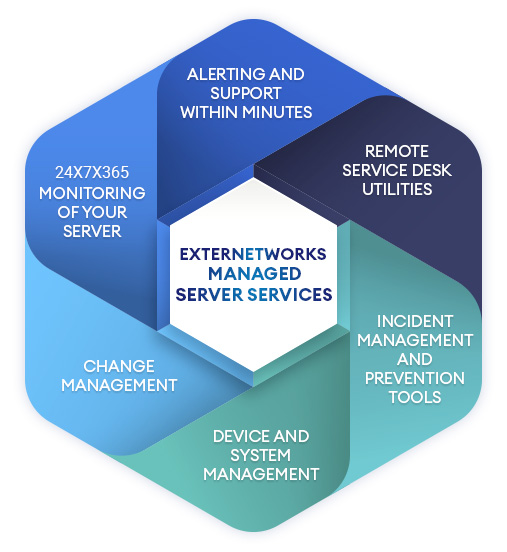
At ExterNetwork we provide:
- 24x7x365 monitoring of your server.
- Alerting and support within minutes.
- Remote service desk utilities.
- Incident management and prevention tools.
- Device and system management.
- Change management.
And more!
5. What are the benefits of ExterNetworks Managed Server & Storage services?
When you outsource to us, we offload your burdensome IT maintenance to ExterNetworks and make sure our managed service and storage services help you focus on other priorities, freeing up staff and mental energy that can be focused on your renewed competitiveness. We pave the way for transformational growth, knowing that your IT never has to be a problem.
6. What are Managed Server & Storage services?
At ExterNetworks, our managed server and storage services are designed to extend your IT staff utilities when limited resources may challenge your productivity, effectiveness, and competitiveness, which can end up putting you at risk of disrupted competitiveness
7. What is a Managed Server service?
We make sure that your IT infrastructure is cared for at all levels, from your hardware integration to operating system installation, maintenance, and support.
8. What services do we offer?
Our services:
- Give you high availability and consistent performance regarding business-critical servers.
- Ensure improved IT governance through controlled and authorized changes whe unnecessary and approved.
- Track performance and give you detailed reports.
- Provide infrastructure and update it with timely releases, updates, and patches.
Feel free to contact us to see what your managed server services may warrant! We look forward to talking with you.