Missed alerts turn into outages, outages turn into lost revenue. ExterNetworks Inc. delivers 24/7 NOC & Help Desk support to keep everything running smoothly.
Get 24/7 IT Support NowEmails are the authenticated communication of the organizations, which are mandatory to be protected against the leakage of sensitive & confidential data. Email encryption helps secure these important mail messages by ensuring the mail reaches the authorized user through many types of email encryption methods & email encryption software.
Email encryption is a procedure that secures the email messages into an unreadable format and ensures the messages are read by authorized users only. Hence, it is difficult for those who are not allowed to read the messages’ contents.
Most popular free-to-use online email services do not encrypt messages sent over the Internet, and hackers can easily intercept these messages and access private information. Email encryption utilizes public-key cryptography and digital signatures to secure emails and ensures that only the intended recipient can read the message.
Email encryption works by encrypting the email message before it’s sent from one device to another. The recipient then decrypts the message using a secret password or private key. This process ensures that only the intended recipient has access to the content of the message.
Encrypting your emails helps protect your privacy and protect against hackers who may be trying to intercept your messages as they travel across the Internet. If someone were able to read your unencrypted emails, they could use your login credentials to gain access to your online accounts and also use your email addresses to send spam messages to others.
With encrypted emails, the email provider will not be able to see what you’re sending unless you permit them to do so. They won’t know anything about your contacts or any sensitive information you might include within the message.
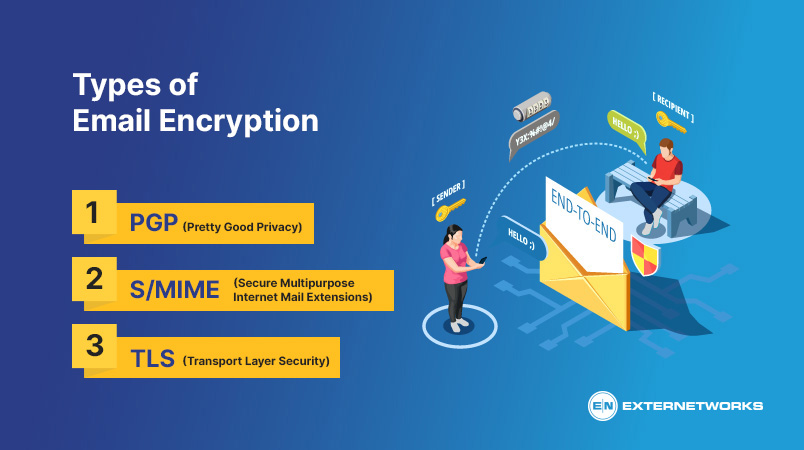
Email encryption software allows you to send and receive encrypted emails through an email client, like Outlook or Apple Mail. This way, the contents of the messages are protected from anyone who might intercept them. Webmail services like Gmail or Yahoo Mail don’t encrypt emails. However, there are third-party services that allow doing so. The most common Email Encryption types are:
Let’s take a detailed look into the types of encryption formats included in the encryption software for Email Encryption:
PGP is an open-source application that enables users to send out encrypted emails. Individuals utilize their public secrets to verify themselves. This means that others can verify who sent the email by checking if the sender unlocked the email with their private key. Use PGP to keep your communications private. It works with Windows, Mac OS X, Linux, iOS, Android, BlackBerry, etc.
S/MIME, known as Internet Engineering Task Force (IETF), is a standard used to deliver public-key encryption and digital signatures. This is now used in the latest email software services and was developed by RSA Data Security. S/MIME is similar to PGP in its functionality, but users need to obtain keys directly from a specific Certificate Authority (CA).
TLS, introduced in 1999, is a cryptographic protocol that secured the Internet first. It enables messages through a secure network and is usually used for email, VoIP, etc.TLS ensures information security and protection between two applications. It runs in the Application Layer and contains the TLS Record and TLS Handshake conventions.
Encrypting an email before sending helps protect sensitive information from unauthorized access. Most email platforms offer built-in encryption options or support additional encryption tools to secure message content and attachments. The exact steps depend on the email service and the recipient’s access requirements.
Step-by-Step Guide to Encrypting an Email
Email security protects business communications from unauthorized access, phishing attacks, malware, and data breaches. Organizations use multiple security methods, including encryption, authentication, anti-phishing controls, and spam filtering, to protect sensitive information and ensure emails reach legitimate recipients safely.
Main Methods of Email Security
| Comparison Factor | Email Encryption | Email Security |
|---|---|---|
| Definition | Converts email content into an unreadable format for unauthorized users. | Protects email systems against cyber threats, unauthorized access, and data breaches. |
| Primary Purpose | Maintains the confidentiality of email messages and attachments. | Provides comprehensive protection against email-based threats. |
| Key Technologies | PGP, S/MIME, TLS, and end-to-end encryption. | Encryption, SPF, DKIM, DMARC, spam filters, MFA, and anti-phishing tools. |
| Threat Protection | Helps prevent unauthorized reading of protected email content. | Helps detect phishing, malware, spoofing, spam, and unauthorized access. |
| Scope | Focuses primarily on protecting message confidentiality and, depending on the method, integrity. | Covers the broader security of email accounts, messages, systems, and communication workflows. |
| Authentication | May use certificates or cryptographic keys to verify identity and message integrity. | Uses authentication controls to verify senders and protect user accounts. |
| Limitations | Does not automatically prevent phishing, compromised accounts, or malicious attachments. | Effectiveness depends on the security controls implemented and how they are configured. |
| Best Use Case | Protecting confidential business emails, financial records, and sensitive attachments. | Protecting organizational email communications against a wide range of cyber threats. |
Key takeaway: Email encryption is one component of email security. Businesses should combine encryption with authentication, anti-phishing protection, spam filtering, and multi-factor authentication for stronger overall protection.
IT teams can monitor encrypted email communications by reviewing audit logs that record sender and recipient details, timestamps, encryption events, and access attempts. These logs help identify suspicious activities and support security investigations.
Organizations should enforce email encryption policies based on data sensitivity and monitor delivery status to identify failed, delayed, or undelivered messages. Automated alerts can help IT teams detect policy violations and quickly resolve email delivery issues.
IT teams should generate compliance reports to verify that email security policies meet applicable regulatory requirements. Restrict administrator access through role-based permissions and monitor it carefully to protect confidential messages while respecting employee privacy.
Email encryption protects message confidentiality, but it does not prevent phishing or malware attacks on its own. Cybercriminals can still send fraudulent emails containing deceptive links, fake login pages, or malicious attachments, even when the messages are encrypted.
Encrypted emails may also contain malware-infected attachments that can compromise devices when opened. Encryption does not guarantee a trustworthy sender or safe content, so users must verify senders and avoid suspicious links or files.
To strengthen email protection, businesses should combine encryption with anti-phishing filters, malware scanning, multi-factor authentication (MFA), and employee security awareness training. These measures help detect malicious messages, prevent unauthorized account access, and reduce the risk of email-based cyberattacks.
Email encryption helps protect sensitive information from unauthorized access, but it also presents certain challenges for businesses and individuals. Understanding its disadvantages and limitations helps organizations choose suitable encryption solutions and implement additional security measures to protect email communications.
Disadvantages of Email Encryption
Limitations of Email Encryption
Email Encryption Solutions offer easy ways for Businesses to encrypt emails by automating the security procedure & allowing users to secure emails quickly. They conserve admins the hassle of setting up encryption tricks, enabling admins to set policies that immediately secure delicate emails.
Cloud-based services typically need a plug-in to be set up in the email client, which provides individuals access to security. This supplies admins with a dashboard to check the sent-out emails, but lots will conceal the material of emails from IT admins.
Numerous security remedies offer end-users more control over their email, with alternatives such as revoking accessibility, stopping email forwarding, stopping printing or copying/pasting emails, and the capacity to request signatures in encrypted attachments. The leading vendors will execute functions best for organizations that need safe invoicing and calls sent out through email.
Get your mail software secured with the email encryption expertise from ExterNetworks.
See how ExterNetworks can help you with Managed NOC Services
Contact Us