Missed alerts turn into outages, outages turn into lost revenue. ExterNetworks Inc. delivers 24/7 NOC & Help Desk support to keep everything running smoothly.
Get 24/7 IT Support NowEvery time you send a text message, stream a video, or load a webpage, your device isn’t transmitting information as one continuous stream. Instead, it breaks everything down into tiny digital units called data packets—the fundamental building blocks of all internet communication. Think of them as the envelopes of the digital world, each carrying a small piece of your information along with instructions for where it needs to go.
Data packets typically range from a few bytes to around 1,500 bytes. This might seem small, but breaking data into these manageable chunks is exactly what makes modern networking possible. Without this approach, a single large file transfer could monopolize an entire network connection, preventing anyone else from sending or receiving information until it finishes.
Each packet contains three essential components: a header with routing information (like a mailing address), the actual data payload (your content), and a trailer that helps verify the information arrived intact. This structured format allows network infrastructure to efficiently route packets across the internet, with each one potentially taking a different path to reach its destination.
The beauty of this system lies in its resilience. If a single packet is lost or corrupted during transmission, only that packet needs to be resent—not the entire message. This packet-switching approach revolutionized telecommunications and remains the backbone of how billions of devices communicate every second.
In most networking contexts, data packet and network packet refer to the same basic concept: a formatted unit of information transmitted across a network. The term “network packet” emphasizes its role in network communication, while “data packet” commonly describes the information divided into smaller units for transmission.
A network packet typically contains control information in its header, the data in its payload, and, depending on the protocol, additional information for error detection. Routers and other network devices use this information to forward traffic toward its destination.
For businesses, understanding this terminology helps IT and network teams interpret monitoring alerts, troubleshoot connectivity problems, and communicate accurately about network performance. Unless someone is discussing a specific protocol or networking layer, people generally use data packet and network packet interchangeably.
When you click send on an email or load a webpage, your device initiates a fascinating process that happens in milliseconds. Understanding how network packets move through the internet reveals why modern digital communication is both remarkably efficient and surprisingly resilient.
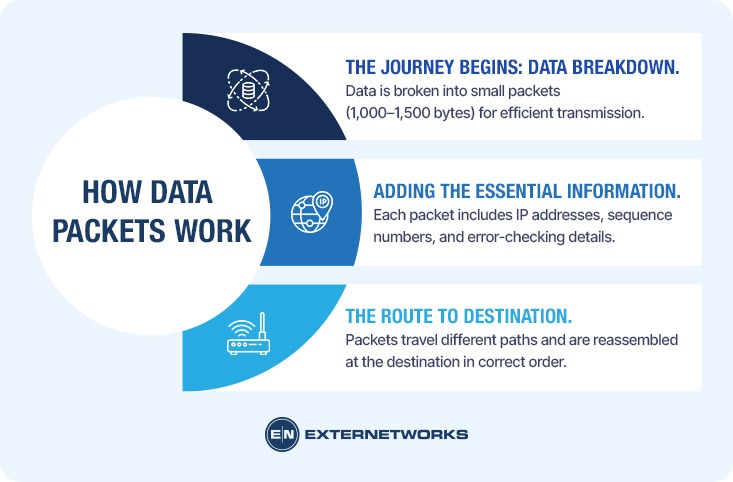
Your device first breaks the information you want to send—whether it’s a photo, message, or video stream—into smaller chunks. According to TechTarget, this process is called packetization, and it ensures that large files don’t monopolize network resources. Each packet typically contains 1,000 to 1,500 bytes of data, a size optimized for network efficiency.
Once divided, each packet receives crucial addressing and routing information, similar to how a postal service requires sender and recipient addresses. The packet’s header gets stamped with source and destination IP addresses, sequence numbers, and error-checking data. This wrapping process happens at your device level before the packet ever reaches a network switch or router.
Packets then travel independently through the network, often taking different paths to reach the same destination. Routers examine each packet’s header and make real-time decisions about the fastest available route. This distributed approach means that if one network path becomes congested or fails, packets reroute through alternative pathways. Upon arrival, the receiving device reassembles all packets in their correct order using the sequence numbers, reconstructing your original message or file perfectly.
Think of IP packets as digital envelopes traveling across the internet. Just as a physical letter contains specific information that helps it reach its destination, each packet contains information that helps it reach its destination correctly. Understanding these components reveals the elegant efficiency of modern networking.
Every data packet consists of three fundamental parts working together. The header acts as the addressing system, containing source and destination IP addresses, sequence numbers, and protocol information. According to Cloudflare, the header typically ranges from 20 to 60 bytes and includes essential routing metadata.
The payload carries the actual data you’re transmitting—whether that’s part of an email, a video frame, or website content. This section varies in size but typically doesn’t exceed 1,500 bytes for standard Ethernet packets. TechTarget explains that keeping payloads reasonably sized prevents any single transmission from hogging network resources.
Finally, the trailer (or footer) contains error-checking information. The most common element here is a cyclic redundancy check (CRC), which helps detect if the packet was corrupted during transmission. If corruption is detected, the receiving device requests retransmission.
This three-part structure enables network monitoring systems to efficiently track and manage data flow, ensuring your information arrives intact and in the correct order.
A packet, TCP segment, and UDP datagram are related but not the same. The terminology depends on the networking layer and transport protocol.
An IP packet is a unit of data at the network layer used to move information between network destinations. A TCP segment is the transport-layer unit used by TCP, while a UDP datagram is the transport-layer unit used by UDP. When transmitted across an IP network, these transport-layer units are carried within IP packets.
| Term | Protocol | Primary purpose | Delivery characteristics |
|---|---|---|---|
| IP packet | IP | Routes data between network destinations | No guarantee of delivery |
| TCP segment | TCP | Reliable, ordered communication | Connection-oriented and reliable |
| UDP datagram | UDP | Lightweight, low-overhead communication | No guarantee of delivery or ordering |
“UDP packet” is commonly used as an informal term for a UDP datagram. Technically, UDP datagram is the more precise terminology.
This distinction matters in business networks because applications have different communication requirements. TCP is generally preferred when reliable, ordered delivery matters, while UDP can be useful for applications where low overhead and responsiveness are priorities. Understanding the protocol involved can help IT teams diagnose packet loss, latency, retransmissions, and application-performance issues.
To understand how data packets function in real-world situations, let’s examine three common scenarios that demonstrate TCP/IP protocols at work.
When you watch a YouTube video, your device sends a request in thousands of packets. The server responds by breaking the video file into smaller segments, each traveling as a separate packet. If packet 157 gets lost in transit, TCP/IP protocols ensure your device automatically requests a replacement without interrupting the entire stream. This seamless recovery happens so quickly you never notice the missing packet.
Example scenario: You’re attaching a 5MB document to an email. Instead of sending one massive file, the email system divides it into roughly 3,500 packets. Each packet takes the fastest available route through the internet, which explains why some arrive before others. Your recipient’s device reassembles these packets in the correct sequence using the header information, recreating your original attachment perfectly—even if the packets traveled through different network segments across multiple continents.
In multiplayer games, every button press becomes a packet racing to the game server and back. Unlike email, gaming requires ultra-low latency, meaning packets must travel with minimal delay. Network infrastructure prioritizes these time-sensitive packets, ensuring your character responds to your commands instantly.
Data packets form the foundation of modern digital communication, enabling everything from sending a simple text message to streaming 4K video. Without packet-based networking, the internet as we know it wouldn’t exist.
The importance of data packets lies in their ability to enable efficient, reliable, and scalable network communication. Instead of monopolizing a connection with a single large file, packets allow multiple users to share network resources simultaneously. When you browse a website while downloading a file, packets from both activities interleave seamlessly across the same connection.
Data packets also enable error recovery without complete retransmission. If corruption occurs during transmission, only the affected packet needs to be resent—not the entire file. The payload within each packet travels with header information that ensures it reaches the correct destination and can be reassembled properly, even if packets arrive out of order.
This architecture provides resilience through redundancy. Networks can route packets dynamically around congestion or failures, automatically finding alternative paths to maintain connectivity. A single broken link doesn’t bring down the entire network—packets take different routes.
For businesses and service providers, understanding packet behavior becomes critical when diagnosing performance issues. Packet loss, latency, and jitter directly impact user experience, making packet-level monitoring essential for maintaining quality of service across modern networks.
Understanding the internal architecture of data packets reveals why they’re so efficient at moving information across networks. Each packet consists of three fundamental components that work together to ensure accurate delivery.
The header contains critical routing and control data that guides the packet to its destination. Think of it as a digital envelope label that includes the source and destination IP addresses, the protocol type (TCP or UDP), and the sequence number. According to Cloudflare, headers typically range from 20 to 60 bytes, depending on the protocol and options used.
The header also includes checksum values to detect transmission errors and Time-to-Live (TTL) settings to prevent packets from circulating indefinitely if routing issues occur.
The payload carries the actual information being transmitted—whether that’s a fragment of an email, a portion of a video stream, or database query results. Network packet analysis reveals that payloads can range from just a few bytes to 1,500 bytes in standard Ethernet configurations.
Some protocols append a trailer containing additional error-checking information, particularly a Cyclic Redundancy Check (CRC) value. This mathematical verification ensures data integrity throughout transmission and triggers retransmission requests when corruption is detected.
While data packets revolutionized digital communication, they come with inherent limitations that affect network performance and reliability. Understanding these constraints helps explain why networks sometimes struggle with certain types of traffic.
Packet loss represents one of the most significant challenges in packet-switched networks. When routers become congested or network links fail, packets can disappear entirely before reaching their destination. According to Cloudflare, this loss requires retransmission protocols to detect and resend missing data, which introduces delays. A packet-switched network relies on each router making independent forwarding decisions, meaning there’s no guaranteed path or reserved bandwidth for any single data stream.
Latency variation, also called jitter, occurs because packets may take different routes and experience varying levels of congestion. This unpredictability proves particularly problematic for real-time applications like video conferencing or online gaming, where consistent timing matters more than raw speed.
Overhead costs add up quickly. Each packet carries header information—typically 20-60 bytes—that contains routing instructions rather than actual user data. For small transmissions, this overhead can exceed the payload itself, reducing overall network efficiency.
The data analyzed through monitoring systems helps identify these patterns, but the fundamental trade-offs between flexibility and predictability remain. Packet-based communication exchanges guaranteed delivery paths for adaptability, a compromise that shapes how modern networks operate.
Businesses can troubleshoot packet loss by identifying where it occurs, how often it happens, and which users, applications, or network paths are affected. Packet loss can result from network congestion, faulty links, overloaded network devices, wireless interference, configuration problems, or connectivity-provider issues.
IT teams can begin by testing connectivity between affected endpoints and their destinations. Tools such as ping and traceroute can help identify packet loss, latency, and potential problem points along a network path. Network monitoring and packet-analysis tools can provide deeper visibility into traffic behavior, interface errors, retransmissions, and congestion.
The investigation should also examine whether packet loss occurs alongside high latency or jitter. Persistent packet loss can affect voice communications, video conferencing, cloud applications, remote access, and other business-critical services.
IT teams should determine whether packet loss is isolated to a specific endpoint, network segment, site, application, or external connection. Review interface errors, bandwidth utilization, device health, routing changes, wireless conditions, and recent configuration changes to identify the likely source.
Comparing results across multiple network paths can also help distinguish an internal network problem from an issue with an upstream connectivity provider. Monitoring packet loss over time helps identify recurring patterns rather than relying on a single connectivity test.
Common troubleshooting tools include ping for basic packet-loss and latency testing, traceroute or tracert for examining network paths, and packet-analysis tools for deeper traffic inspection. Network monitoring platforms can additionally track packet loss, latency, jitter, interface errors, bandwidth utilization, and other performance indicators over time.
For enterprise environments, combining these tools with historical monitoring data can help IT teams identify recurring problems and determine whether an issue is isolated or part of a broader network-performance trend.
The appropriate corrective action depends on the root cause. It may include resolving congestion, replacing faulty hardware or links, correcting configuration issues, improving wireless coverage, adjusting traffic policies, or working with a connectivity provider.
Packet loss can reduce the performance and reliability of business applications by forcing affected data to be retransmitted or delaying or dropping portions of a communication session. The impact depends on the amount of packet loss, the application, and the protocol being used.
For example, packet loss can cause poor voice quality in VoIP calls, frozen or degraded video conferencing, slow cloud applications, interrupted remote sessions, and delays when accessing business systems. Persistent packet loss can therefore affect employee productivity and the user experience even when the network remains technically available.
The business impact is usually greater for applications that depend on continuous, time-sensitive communication. IT teams should evaluate packet loss alongside latency, jitter, application performance, and the criticality of the affected service, rather than treating packet loss as an isolated metric.
Latency is the time required for data to travel between endpoints. Jitter is variation in packet arrival times, while packet loss occurs when packets fail to reach their intended destination. These conditions can affect application performance in different ways.
High latency can make applications feel slow or unresponsive. Jitter can cause inconsistent performance in real-time communications, while packet loss can result in retransmissions, missing information, degraded media quality, or interrupted sessions.
For businesses using cloud applications, VoIP, video conferencing, remote access, and other network-dependent services, monitoring these metrics together provides a better view of network health than looking at bandwidth alone.
IT teams should monitor several packet-related metrics to understand network performance and identify potential application-impacting problems:
Monitoring these metrics over time lets IT teams establish normal performance levels, spot abnormal patterns, and correlate network conditions with application- or user-impacting incidents.
Businesses should investigate packet loss when it is persistent, increasing, occurring across critical network paths, or associated with noticeable application-performance problems. A brief isolated packet-loss event may not indicate a significant issue, but recurring loss can signal congestion, failing hardware, unstable connectivity, or another underlying network problem.
IT teams should pay particular attention when packet loss coincides with increased latency, jitter, retransmissions, application timeouts, poor VoIP or video quality, or complaints from users at a specific location.
The goal is to determine whether packet loss is an isolated network event or a recurring condition that could affect business-critical services. Continuous monitoring and historical performance data can help organizations identify trends early and prioritize network issues based on their operational impact.
Data packets represent one of computing’s most elegant solutions to a complex problem: how to move information reliably across imperfect networks. By breaking data into small, independently routable chunks—each tagged with crucial metadata like source and destination IP address—the internet achieves both efficiency and resilience that monolithic data transmission could never match.
Several principles make this system work. Packets enable fault tolerance by allowing rerouting when paths fail. They maximize bandwidth utilization through statistical multiplexing across shared infrastructure. And they simplify error recovery by retransmitting only lost fragments rather than entire files.
However, this architecture comes with trade-offs worth understanding. Latency sensitivity affects real-time applications, packet loss degrades quality, and overhead consumes bandwidth. For organizations managing critical network infrastructure, monitoring network health becomes essential to maintaining performance standards.
The next time you stream video, send an email, or browse websites, remember: your data is traveling as thousands of tiny packets, each finding its own path through the global network maze. This seemingly chaotic system, governed by precise protocols and routing algorithms, powers our connected world with remarkable efficiency. Understanding packets means understanding the foundation of digital communication itself.
See how ExterNetworks can help you with Managed NOC Services
Contact Us