Missed alerts turn into outages, outages turn into lost revenue. ExterNetworks Inc. delivers 24/7 NOC & Help Desk support to keep everything running smoothly.
Get 24/7 IT Support NowEvery piece of software has weak spots. Security testing is the process of finding those weak spots before attackers do — evaluating a system’s defenses to uncover vulnerabilities, misconfigurations, and gaps that could expose sensitive data or disrupt operations.
Think of it like a home inspection before you buy a house. You’re not assuming something is wrong; you’re making sure nothing is. In the software world, skipping this step can be costly. According to CrowdStrike, security testing helps organizations identify risks across their entire attack surface — from infrastructure applications — before those risks become incidents.
Software testing security isn’t a single technique. It’s a discipline that spans many methodologies, each targeting different layers of a system. Some tests probe networks, others focus on web applications, and some simulate a full-scale attack to see how far a real threat actor could get. A good starting point is understanding how networks are assessed for weaknesses, since infrastructure vulnerabilities are among the most commonly exploited.
At its core, security testing answers three questions:
Security testing done right transforms unknown risks into manageable, fixable problems — giving teams clarity instead of guesswork. The next step is understanding the specific types of tests available and the situations each is designed for.
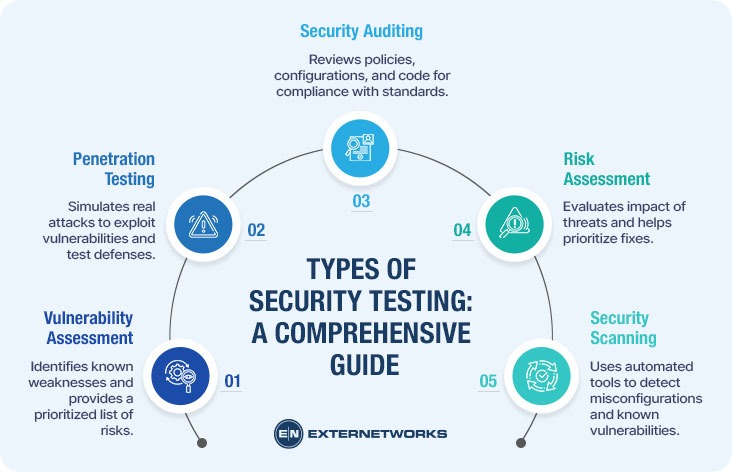
Not all software security testing looks the same. Depending on what you’re trying to protect — and what threats you’re most worried about — there are several distinct approaches, each designed to catch different kinds of problems.
Here are the most common types you’ll encounter:
The right testing type depends entirely on your goals, environment, and risk tolerance — there’s no single method that covers everything.
According to HackerOne, combining multiple approaches yields far more comprehensive coverage than relying on any single method. In practice, most mature security programs layer these techniques together rather than choosing just one.
With a clear picture of the types of testing that exist, the natural next question is how to put them into practice, which is exactly what we’ll walk through next.
Knowing what security testing is only gets you so far. The real value lies in knowing how to do it. A structured application security testing process keeps teams focused, reduces missed vulnerabilities, and makes results repeatable. Here’s a practical breakdown of how most testing efforts unfold.
Step 1: Define Your Scope and Objectives Before touching a single tool, decide what you’re testing and why. Are you protecting a customer-facing web app? An internal API? Clarifying scope prevents wasted effort and keeps testing focused on what matters most.
Step 2: Gather Information and Reconnaissance This phase involves mapping out the target system — understanding its architecture, entry points, and dependencies. Think of it like studying a building’s blueprint before looking for unlocked doors. Passive and active reconnaissance techniques both play a role here.
Step 3: Identify and Prioritize Vulnerabilities Using your chosen testing method — whether automated scanning or manual review — catalog potential weaknesses and rank them by severity. Not every flaw carries equal risk.
Step 4: Attempt Exploitation This is where testers verify whether a vulnerability is actually exploitable, not just theoretical. Black-box approaches simulate real attacker behavior without insider knowledge, adding realism to findings.
Step 5: Report and Remediate. According to OWASP, clear documentation is essential — findings should include severity ratings and actionable remediation guidance. Fixing vulnerabilities without proper records means the same issues often resurface.
Step 6: Retest. After fixes are applied, verify they actually work. Retesting closes the loop and confirms your system is genuinely more secure.
Understanding these steps sets the stage for choosing the right tools to carry them out effectively.
Now that you have a process in place, the next question is: what tools actually help you carry it out? The right combination of tools and techniques can make the difference between a surface-level scan and a genuinely thorough assessment.
Security testing typically relies on a mix of automated tools and manual expertise. Automated scanners are great for speed — they can sweep through hundreds of endpoints quickly, flagging known vulnerabilities and misconfigurations. But automation has limits. It can’t replicate the creative, logic-driven thinking that a skilled tester brings to the table, especially during penetration testing, where the goal is to think like an actual attacker.
Commonly used tool categories include:
According to GitHub’s security resources, a layered approach — combining multiple tool types — consistently produces better coverage than relying on any single method.
One practical approach is to pair automated scans with manual reviews. Automated tools catch the obvious issues fast; manual testers catch the subtle, context-dependent flaws that scanners miss. If you’re starting, it’s worth understanding how identifying network weaknesses fits into your broader testing strategy.
Even the best tools won’t help if they’re applied inconsistently — which leads directly to some of the most common pitfalls teams run into.
Even with the right tools and a solid process in place, cybersecurity testing efforts can fall short — not because the approach is wrong, but because of a few recurring, avoidable mistakes. Knowing what they are puts you in a much stronger position.
Testing only once. Security isn’t a checkbox you tick and forget. Applications change, new dependencies get added, and fresh vulnerabilities emerge constantly. A one-time test leaves you blind to anything that surfaces afterward. The fix? Build testing into your regular development and deployment cycles.
Ignoring low-severity findings. It’s tempting to focus only on critical vulnerabilities, but attackers often chain together smaller weaknesses to cause serious damage. Treat every finding as worth reviewing, even if it doesn’t demand immediate action.
Skipping scope definition. Jumping into testing without a clear scope wastes time and disrupts operations. Before any test begins, define exactly what systems, endpoints, and environments are in play. This is especially relevant if you’re just getting started with security basics.
Not retesting after fixes. Patching a vulnerability doesn’t always mean it’s fully resolved. Retesting confirms that the fix actually works and hasn’t introduced new issues.
Relying solely on automated tools. Automation is powerful, but it has blind spots. Manual review catches logic flaws and business-layer vulnerabilities that scanners routinely miss. According to CrowdStrike, combining automated and manual methods consistently produces more thorough results.
Avoiding these pitfalls makes a meaningful difference — though it’s worth acknowledging that security testing has inherent limitations that no team can fully eliminate.
Even the most thorough vulnerability testing process has its boundaries. Understanding those limitations upfront helps you set realistic expectations and make smarter decisions about where to invest your security efforts.
Testing captures a moment in time. New vulnerabilities are discovered every day, which means a clean report today doesn’t guarantee a clean environment tomorrow. Security testing is not a one-and-done activity — it requires ongoing testing to remain relevant.
A few other limitations worth keeping in mind:
On the other hand, these limitations don’t make security testing less valuable — they reinforce why it should be part of a broader, layered security strategy. Pairing regular testing with continuous endpoint monitoring helps close some of those gaps between assessments.
No single test covers everything, but consistent testing covers far more than none at all. Keeping that mindset is what separates proactive security teams from reactive ones — and that’s a key thread running through everything we’ve covered so far.
Security testing isn’t a one-time checkbox — it’s an ongoing commitment to understanding where your systems are vulnerable before attackers do. Throughout this guide, we’ve covered what security testing is, why it matters, the different types available, and how to build a practical process around it.
Here’s a quick recap of what to keep in mind:
Security testing is most powerful when it becomes a habit, not a reaction. According to NIST, grounding your testing process in authoritative standards helps ensure consistency and credibility across your security program.
Start small if you need to—but start. Even a basic vulnerability scan today puts you ahead of where you were yesterday.
See how ExterNetworks can help you with Managed NOC Services
Contact Us