Editor’s Note: Managed router services provide businesses with expert setup, continuous management, and optimization of router infrastructure to ensure robust connectivity and security. The article details advantage... Read More
Missed alerts turn into outages, outages turn into lost revenue. ExterNetworks Inc. delivers 24/7 NOC & Help Desk support to keep everything running smoothly.
Get 24/7 IT Support NowA lot of small businesses struggle with managing their network infrastructure. They either don’t know how to do it or don’t have the resources to do it properly.
Managed routers are a great way to save money, increase productivity, and reduce downtime, and they’re so effective that most large companies also use them. If you’re not using managed routers, you should be. Here’s Why
A managed router is a network appliance that provides secure, reliable and cost-effective access to the organization’s private or public IP address space. It also offers centralized management for all your networking equipment. It can be used as an internal firewall, VPN gateway, wireless access point, DHCP server, DNS server, WAN link aggregation, Network load balancer, etc.
A managed router uses one or more physical interfaces (or ports) to connect to the outside world. Each port has its unique IP address, which the service provider typically assigns. Each time you add another interface to your managed router, you must assign a new IP address.
The managed router also contains software that manages the configuration of these interfaces. When you configure the managed router, you configure the software on the managed router. You cannot change the hardware of the managed router.
You must have administrative privileges to use a managed router. If you do not have administrative rights, ask the system administrator to perform this task. You can remotely control the managed router using Telnet or Secure Socket Shell (SSH). You can monitor the status of the managed router using the Simple Network Management Protocol (SNMP).
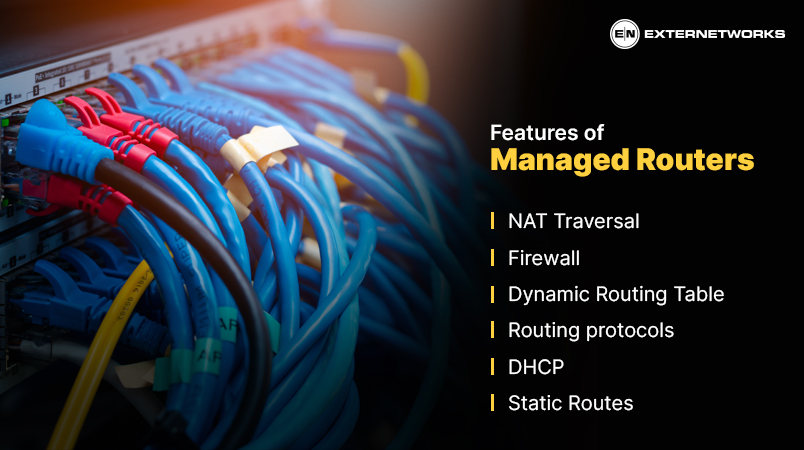
Managed Routers come with various features such as:
To understand how a managed router works, we first need to understand what happens when a computer connects to the Internet.
When a computer connects to the internet, it sends out data packets across the wire to the destination specified in the packet. At the same time, the computer receives incoming packets of data from the source specified in the packet. The computer processes the received data and forwards them to the appropriate application.
When a computer connects to the managed router, the computer gets an IP address from the managed router. This is known as the local IP address. The computer then sends data packets to the managed router, and the managed router receives them and forwards them to the destination.
The packets are forwarded directly to the destination computer if the destination is within the same LAN as the managed router. The packets are sent to the gateway server if the destination is outside the LAN. The gateway server determines whether the destination is on the internal or public networks.
In addition to forwarding packets, the managed router also provides other services to client computers. It may assign an IP address to each client’s computer. It also sets up the default route to send all packets destined to the managed router. Finally, the managed router may allow users to configure settings.
A managed router services has many benefits. Some of these include:
Buying a router and subscribing to a managed router service are different approaches to managing network connectivity. With a traditional router purchase, the business owns the equipment and is generally responsible for installation, configuration, firmware updates, monitoring, troubleshooting, maintenance, and replacement. With a managed router service, a provider takes responsibility for some or most of these operational tasks, depending on the service agreement.
| Area | Managed Router Service | Customer-Owned, Self-Managed Router |
|---|---|---|
| Equipment | The provider may supply, lease, or manage the router. Some providers can also manage customer-owned equipment. | The business purchases and owns the router. |
| Monitoring | The provider can continuously monitor router health, traffic, performance, and alerts and investigate detected issues. | The business or its IT team must deploy and operate its own monitoring tools and respond to alerts. |
| Configuration | The provider typically handles initial configuration and approved configuration changes. | Internal IT configures routing, access controls, quality of service, VPNs, and other features. |
| Maintenance | Depending on the contract, the provider may handle software updates, hardware maintenance, troubleshooting, and replacement. | The business is responsible for firmware updates, hardware maintenance, troubleshooting, and replacement. |
| Support | Support and incident management are provided according to the service agreement, its coverage hours, or the SLA. | Support comes from the internal IT team, router vendor, or a separately purchased support contract. |
| Responsibility | Responsibility is shared according to the provider’s service boundary. The provider may manage the router while the customer remains responsible for power, physical access, cabling, or other infrastructure. | The business retains primary responsibility for the router and its operation. |
| Upfront cost | Depending on the model, there may be little or no separate equipment purchase because the managed service can include the router. | The business pays for the router and may also need separate licenses, support, monitoring, and maintenance. |
| IT workload | Reduces routine router administration handled internally. | Requires internal staff or contractors to manage the router throughout its lifecycle. |
| Control | Configuration and changes may be subject to the provider’s processes and service scope. | The business has direct control over the equipment and configuration. |
The main distinction is not simply who owns the router. Managed router service transfers ongoing operational responsibility to a service provider, while buying a router leaves that responsibility primarily with the customer.
For example, if a router develops a configuration problem, a managed service may include remote diagnosis, configuration correction, monitoring, and escalation to the appropriate support team. With a self-managed router, the business’s IT team generally has to identify the problem, investigate the configuration, apply the fix, and coordinate vendor support when necessary.
However, the exact division of responsibility varies by provider. A managed service can even operate on customer-owned equipment, meaning the business owns the router while the provider handles monitoring, configuration, and support.
Therefore, businesses comparing the two options should look beyond the router’s purchase price. They should examine what the managed service actually includes: monitoring hours, configuration changes, firmware management, hardware replacement, incident response, on-site support, escalation procedures, and the responsibilities that remain with the customer.
No. A managed router is not necessarily a firewall. A managed router primarily handles network connectivity and routing, such as directing traffic between networks, connecting branch offices to WAN services, and managing routing policies. The term managed refers to how a service provider operates and supports the router, not that it automatically provides firewall protection.
A firewall, by comparison, is designed primarily to enforce security policies by controlling which network traffic is allowed or blocked based on rules and security criteria.
The two functions can overlap. Some managed routers include built-in firewall or security capabilities, while other deployments use a separate firewall alongside the router. The exact functionality depends on the router model, service configuration, and provider’s managed service scope.
| Function | Managed Router | Firewall |
|---|---|---|
| Primary purpose | Routes traffic between networks and manages connectivity | Controls and filters traffic according to security policies |
| Routing | Core function | May support routing, but security enforcement is the primary role |
| Traffic filtering | May provide basic filtering or access controls | Core security function |
| Monitoring | Provider may monitor connectivity, performance, and device health | May monitor and analyze security events and traffic |
| Management | Provider can handle configuration, updates, troubleshooting, and monitoring. | Can be managed internally or by a security/managed service provider |
| Security features | May include firewall, VPN, ACL, or other security functions depending on the device | Typically provides more extensive security policy and inspection capabilities. |
No. A managed router does not automatically provide complete network security. Managed router services can improve security through features such as access control lists, traffic filtering, VPNs, firewall capabilities, secure configuration, firmware updates, and continuous monitoring. However, these controls generally protect the network boundary or connectivity layer rather than addressing every security risk across an organization.
Complete network security typically requires multiple layers of controls, including:
A managed router can therefore be one component of a broader defense-in-depth strategy, rather than a standalone security solution. Organizations should review which security functions their managed router service includes and determine what additional controls they need for endpoints, users, applications, data, and the wider network environment.
Buying a router and subscribing to a managed router service are different approaches to managing network connectivity. With a traditional router purchase, the business owns the equipment and is generally responsible for installation, configuration, firmware updates, monitoring, troubleshooting, maintenance, and replacement. With a managed router service, a provider takes responsibility for some or most of these operational tasks, depending on the service agreement.
In conclusion, a managed router is a powerful tool that can help you increase productivity and save money. With a managed router, you will be able to monitor and control your network, and also, you can configure your network as per your needs.
See how ExterNetworks can help you with Managed NOC Services
Contact Us