Editor’s Note: This article investigates the evolving challenges in managing and securing mobile devices amid increasing BYOD adoption, compliance demands, and diverse platforms. It advocates for comprehensive Mobil... Read More
Missed alerts turn into outages, outages turn into lost revenue. ExterNetworks Inc. delivers 24/7 NOC & Help Desk support to keep everything running smoothly.
Get 24/7 IT Support NowHow often do you hear about Mobile Device Management (MDM)? If you’re like me, you probably don’t even know what MDM means. What does it mean for your organization?
Mobile devices are becoming ubiquitous, and they are now part of our daily lives. They play a critical role in our businesses, and organizations need to manage them effectively.
Mobile Device Management (MDM) is the practice of managing mobile devices within an enterprise environment. The goal of MDM is to provide security, control, and compliance across multiple platforms. In this article, we will discuss what MDM is, how it works, and the top 5 challenges of Mobile Device Management.
A mobile device management system helps organizations control how employees use company-issued smartphones, tablets, and other mobile devices.
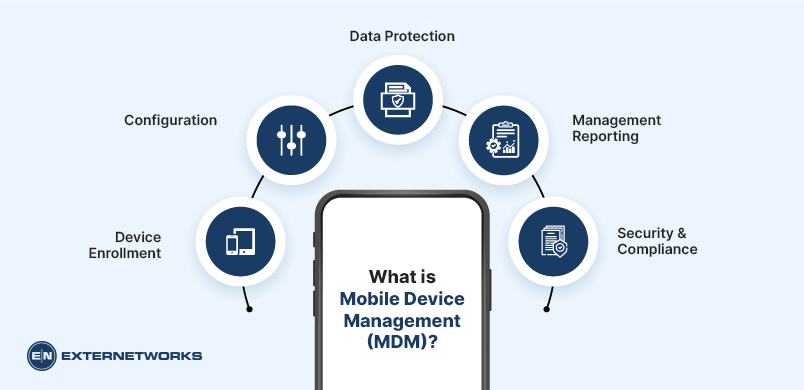
The goal is to help businesses cut costs by reducing lost productivity due to employee misuse of these devices. It includes:
Device Enrollment: involves enrolling new users in an organization’s MDM system. The user must first download the MDM app on their smartphone before being enrolled in the company’s MDM system. Once registered, the user must sign in with the same credentials every time they use the device.
Configuration – After the user is enrolled, the MDM administrator can configure device settings. These include setting up security policies, blocking certain websites, and restricting access to specific applications.
Data Protection – Users must keep all corporate data confidential while using the device. Therefore, they should not install personal apps or use third-party apps without admin authorization.
Management Reporting – Administrators can monitor how much data each employee consumes through the MDM app. They can also track which apps have been downloaded and when they were installed.
Security Compliance – Organizations may require their employees to comply with specific regulations and policies. For example, some companies may want employees to use only official apps for work. In this case, the MDM administrator would block unofficial app installations.
Mobile Device Management works by installing an agent onto the device. This agent acts as a proxy between the device and the network, intercepts all communications, and forwards them to the MDM server.
The MDM server performs actions based on the admin’s rules. The MDM server will block requests if the admin has configured the device to allow applications from a specific website.
The primary purpose of MDM is to allow IT administrators to control all aspects of a device’s operation centrally. This means that if an admin wants to change a device’s settings, they don’t need to adjust each setting individually. Instead, they can just update the settings from the central location.
In addition, MDM lets admins monitor and track users’ activities on the network. For example, if an employee leaves the office without logging off their computer, an administrator could be notified via email or text message. Another advantage of using MDM is that it helps prevent unauthorized access to personal information stored on the device.
Mobile device management helps organizations control how employees access corporate resources. In addition, MDM protects sensitive company information. By monitoring employee behavior, admins can identify potential threats and act before they cause damage.
In conclusion, the mobile device management market is growing rapidly. As smartphones and tablets become more common, businesses increasingly rely on them for both personal and professional use. However, while these devices are convenient, they pose security risks.
To keep your organization’s data safe, you must invest in an effective mobile device management platform. Vendors claim to have the best products, but only a few can deliver. Avoid costly mistakes.
Mobile Device Management (MDM), originally designed to help businesses manage employees’ smartphones, tablets, and laptops, has become a popular tool for organizations looking to improve security and productivity. But despite its benefits, MDM comes with challenges that need to be addressed. Here are five major concerns:
When an employee uses his smartphone to access corporate email, share documents, or send messages, he’s sending personal information across the Internet. This includes confidential company files, financial details, and photos. Because of this, companies must take extra precautions to ensure that no one gains unauthorized access to private data.
Unfortunately, MDM solutions don’t always protect against this type of security breach. Some vendors allow employees to install apps on their phones without permission, meaning any apps they download could contain malicious code that compromises the organization’s security.
MDM providers should encrypt data at rest and in transit to prevent this. They also need to ensure that only authorized users can connect to the network. If someone gains access to sensitive data, they shouldn’t be able to read or copy it.
Most MDM solutions come from large technology companies like Apple, Google, Microsoft, and Samsung. While these vendors are great at developing new products and services, they aren’t necessarily known for their flexibility in supporting third-party applications.
For example, if you want to integrate an app into your MDM platform, you’ll typically have to do so through an API. This means that you won’t be able to use the same application on other platforms. As a result, you’re locked into using the vendor’s particular app version.
As mentioned above, most MDM solutions are complex, making them difficult to set up and maintain. Most people lack the expertise to configure and troubleshoot these systems.
Mobile device management isn’t cheap. Implementing and maintaining an MDM solution can add up quickly. Many vendors charge monthly fees based on the number of devices managed. These costs can easily exceed $100 per user. The more devices you add, the higher your monthly cost becomes. Many vendors offer cheaper plans that include fewer features. Before signing up, find out what each plan includes.
While many MDM solutions provide useful features, they often lack intuitive interfaces. This makes it hard for users to perform basic tasks like installing apps or backing up data. Sometimes, even after a device has been connected to the MDM server for some time, it still won’t appear under the “Manage Devices” section of the app. Other times, the device might appear, but the apps won’t function correctly. These issues stem from problems within the MDM system itself. The best way to fix this is to contact the vendor directly.
Implementing Mobile Device Management (MDM) helps organizations secure corporate devices, protect sensitive business data, and simplify device administration. A successful MDM implementation requires careful planning, clear security policies, employee communication, and continuous monitoring.
Here are seven best practices for implementing MDM effectively:
Identify all smartphones, tablets, laptops, and other endpoints that access company resources. Record device ownership, operating systems, software versions, and security status. Categorize devices as corporate-owned or Bring Your Own Device (BYOD) to determine appropriate management policies.
Plan Device Enrollment: Develop a standardized enrollment process before deploying an MDM solution. Choose suitable enrollment methods, such as automated enrollment, QR codes, or user-initiated registration. Establish procedures for enrolling new devices, replacing existing devices, and removing devices when employees leave the organization.
Establish Strong Security Policies: Configure security policies that protect devices and business information. Require strong passwords, device encryption, screen locks, and regular operating system updates. Enable remote locking and selective or full data wiping, where appropriate, to protect sensitive information if a device is lost or stolen.
Implement Role-Based Access Controls: Use role-based access control (RBAC) to restrict access to corporate applications and data based on employee responsibilities. Enforce multi-factor authentication (MFA), apply least-privilege principles, and use device compliance checks to prevent unauthorized or noncompliant devices from accessing sensitive resources.
Test MDM Policies Before Full Deployment: Conduct a pilot deployment with a small group of employees and different device types. Test enrollment, application installation, security restrictions, remote management, and compatibility with business applications. Resolve configuration issues before expanding the deployment across the organization.
Communicate MDM Policies to Employees: Explain why MDM is being implemented, what information administrators can access, and how device management affects employee privacy. Provide clear enrollment instructions, training materials, and IT support contacts. For BYOD environments, distinguish between personal and corporate data and explain the organization’s device management capabilities.
Continuously Monitor and Update Devices: Regularly monitor enrolled devices for compliance violations, outdated software, suspicious activity, and security vulnerabilities. Configure automated alerts, review device health reports, and update security policies as business requirements change. Periodically audit access permissions and remove inactive or unauthorized devices.
Measuring Mobile Device Management (MDM) effectiveness helps organizations evaluate device security, policy compliance, operational efficiency, and overall management performance. By tracking key performance indicators (KPIs), IT teams can identify security gaps, improve device management processes, and reduce operational risks.
Here are six important metrics for measuring MDM effectiveness:
Device enrollment coverage measures the percentage of eligible corporate and BYOD devices successfully registered with the MDM platform. A high enrollment rate indicates better visibility and control over devices accessing business resources.
Metric: (Number of enrolled devices / Total eligible devices) X 100
Policy compliance measures the percentage of managed devices that meet organizational security requirements, including password protection, encryption, screen locks, and access restrictions. Monitoring compliance helps IT teams identify devices that violate security policies and require corrective action.
Metric: (Number of compliant devices / Total managed devices) X 100
This metric tracks how many managed devices are running approved operating system versions and required security updates. IT administrators should monitor outdated software, missing patches, and devices that have not received critical updates.
Metric: (Number of devices meeting update requirements / Total applicable managed devices) X 100
Tracking security incidents helps organizations evaluate how effectively MDM policies protect corporate devices and data. Important indicators include lost or stolen devices, unauthorized access attempts, malware detections, and policy violations. Monitoring incident frequency and severity helps identify recurring security risks.
The number of support tickets associated with device enrollment, application deployment, connectivity, access restrictions, and policy configuration indicates how efficiently the MDM solution operates. Analyzing ticket volume, recurring issues, and resolution rates helps IT teams improve device management and employee experience.
Average remediation time measures how long IT teams take to resolve device security issues or compliance violations after detection. These issues may include outdated operating systems, failed security checks, unauthorized applications, or compromised devices.
Metric: Total time taken to remediate incidents/number of remediated incidents
If you’re interested in finding the right MDM provider for your business, here are 5 things you should look for:
Find out how well the vendor supports different operating systems. Some vendors support Windows Phone, BlackBerry OS, and more, while others focus solely on iOS and Android.
Check whether the vendor provides APIs for integrating your custom apps. This lets you create unique workflows that suit your specific needs.
Look for a vendor that encrypts data at rest and in transit. It should also limit which apps can be installed on devices. Finally, it should alert you to breaches and tell you what steps to take to remediate them.
Find a vendor that lets you customize its interface to fit your workflow. The best ones are easy to navigate and offer a variety of options.
Make sure the vendor offers training materials so you can learn how to implement its tools. You should also get hands-on experience with the product before signing a contract.
At ExterNetworks, we believe that businesses deserve better than traditional mobile device services. Our goal is to help small businesses grow by providing the tools needed to stay competitive in today’s marketplace. Contact us today to learn how ExterNetworks can help your company!
See how ExterNetworks can help you with Managed NOC Services
Contact Us