Editor’s Note: This article categorizes ransomware types, including encrypting, locker, and scareware variants, highlighting their operational differences and dangers. It underscores the need for tailored defense te... Read More
Missed alerts turn into outages, outages turn into lost revenue. ExterNetworks Inc. delivers 24/7 NOC & Help Desk support to keep everything running smoothly.
Get 24/7 IT Support NowRansomware attacks are becoming more common. They are usually spread through email attachments, malicious websites, infected USB drives, etc. Once installed, ransomware encrypts files on your computer, making them inaccessible unless you pay a ransom.
There are many different types of ransomware attacks. Some are designed to target specific operating systems (Windows, Mac OS X, etc.), and others are generic. Most are targeted at individuals, not businesses. Cryptowall targets Windows computers and demands USD 300 per machine, and CryptoDefense targets Mac OS X machines and USD 200 per machine.
A ransomware attack occurs when someone gains access to your computer or mobile device by exploiting a vulnerability in your operating system or web browser. Once they gain control of your machine, they may install malware (malicious software) onto it, which will encrypt all your important files. They may then send you an email demanding money to unlock your files. If you don’t pay, they threaten to delete your files forever.
There are many different strains of ransomware out there. Some are designed to target specific industries, and others are designed to target individual users. Each strain will have its unique features, which means that it’s important to know what type of ransomware you’re dealing with before you start paying off the hacker.
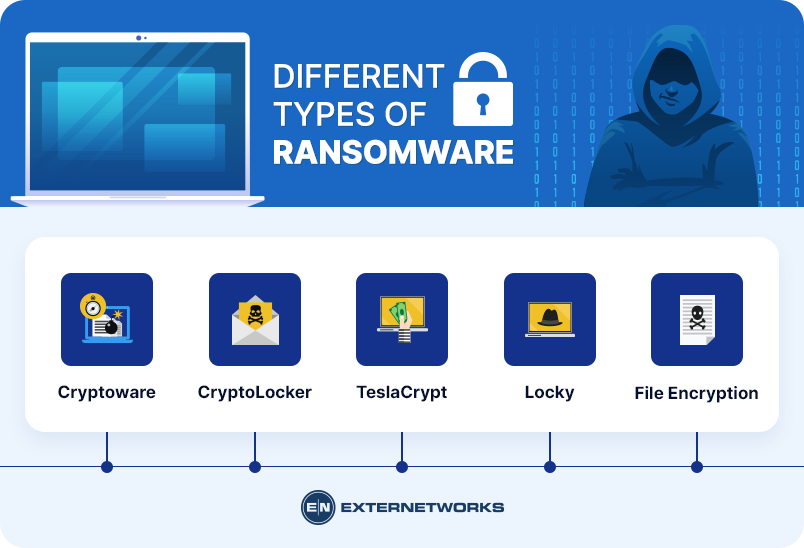
Cryptoware – Cryptoware is a type of ransomware that locks down all of your files, and it can be used against both personal and commercial computers. There are several variations of cryptoware, and here are some examples:
CryptoLocker – This variant was first discovered in 2013. It uses AES 256-bit encryption to lock down your files. You have 72 hours to pay a ransom before permanently deleting your files.
TeslaCrypt – This variant was also discovered in 2013. It’s similar to CryptoLocker in terms of its encryption technology. However, unlike CryptoLocker, TeslaCrypt allows you to choose which files to encrypt.
Locky – This variant was discovered in 2014. It uses RSA 2048 bit encryption to lock down your data. Unlike other cryptowares, Locky doesn’t require a ransom payment to decrypt your files. Instead, it deletes encrypted files after seven days.
File Encryption – File encryption is ransomware where only specific files are locked down. These files include documents, images, videos, databases, spreadsheets, presentations, etc. This makes it easier to recover your files because you know exactly which ones were affected.
Here are some examples of file encryption:
WannaCry – This variant was discovered earlier this year. It affects Microsoft Windows XP, Vista, 7, 8, and 10. It encrypts files using AES 128-bit encryption and then sends a message to victims warning them that their files will be deleted within 48 hours if they do not pay a ransom.
Petya/NotPetya – affects Microsoft Windows 2000, 2003, 2008, 2012, and 2016. It encrypts files with AES 256-bit encryption and then displays a ransom note. Victims must pay a ransom of 0.5 BTC (USD 2,000) to get their files back.
The most dangerous ransomware types for businesses are double-extortion ransomware, data-encrypting ransomware, and ransomware that combines encryption with data theft. Double-extortion attacks are especially disruptive because attackers encrypt business systems and steal sensitive data, threatening to publish it if the ransom isn’t paid. This can result in extended downtime, data loss, regulatory exposure, reputational damage, and financial losses.
Locker ransomware can also disrupt operations by preventing users from accessing systems or applications, while triple-extortion ransomware may add pressure by targeting customers, partners, or other third parties. Overall risk depends on the affected systems, the sensitivity of stolen data, how quickly you contain the attack, and the availability of reliable backups.
For businesses, ransomware recovery is generally more difficult when attacks involve data exfiltration, widespread network encryption, compromised backups, or lateral movement across multiple systems. Organizations can reduce these risks with immutable or offline backups, endpoint detection and response (EDR), network segmentation, multi-factor authentication (MFA), vulnerability management, least-privilege access, and a tested incident response plan.
Businesses can protect backups from ransomware by maintaining immutable, offline copies that attackers cannot modify or encrypt. Offline, air-gapped, or logically isolated backups provide an extra recovery layer if attackers compromise production systems and connected backup repositories. Organizations should also separate backup infrastructure from the primary network and restrict unnecessary connections between them.
Strong backup access controls are equally important. Use dedicated backup accounts, least-privilege permissions, multi-factor authentication (MFA), and separate administrative credentials to prevent attackers from deleting or altering backup data. Also monitor backup activity for unusual deletion, encryption, or configuration changes.
Businesses should regularly test backups and validate recovery procedures rather than assuming backups will work during an incident. Run scheduled restore tests, verify backup integrity, confirm you can restore critical applications and data, and document recovery procedures. Regular recovery validation helps identify corrupted or incomplete backups before a ransomware attack occurs.
Ransomware can spread across a business network after attackers gain access through compromised credentials, phishing, vulnerable systems, or exposed remote services. Once inside, attackers may use stolen usernames and passwords to access additional computers, servers, VPNs, or administrative accounts. Unpatched operating systems, applications, and network devices can also provide opportunities to move deeper into the environment.
Attackers can further spread ransomware through shared drives, network storage, remote desktop services, and other connected resources. During lateral movement, they may compromise additional endpoints, escalate privileges, turn off security controls, and deploy ransomware across multiple systems. This can turn a single infected device into a broader network-wide incident.
Businesses can limit ransomware propagation through network segmentation, multi-factor authentication, least-privilege access, timely patching, endpoint detection and response (EDR), secure remote access, and continuous network monitoring. Restricting access between systems and monitoring unusual authentication or file activity can help detect lateral movement before ransomware reaches critical infrastructure.
If you receive an email asking you to pay a ransom to decrypt your files, there is a good chance you’ve been infected with ransomware. Unfortunately, many people ignore these emails, thinking they’re spam. Others fall victim to phishing scams that look like legitimate messages from banks, credit card companies, etc.
If you think you might have fallen victim to a ransomware infection, here are some things to check out:
You should change passwords for all accounts with sensitive information. Hackers often steal login credentials through social engineering techniques.
There are several ways you can protect yourself against future ransomware attacks:
A recent report from Symantec found that ransomware attacks were increasing by 20% per year. This was because criminals were using new techniques to distribute malware. One example is phishing emails to trick users into clicking on links that download malware onto their computers. Another technique is social engineering, where cybercriminals pretend to be legitimate organizations like banks or government agencies. They may ask victims to click on links or attachments that install malware.
Businesses are targeted because they hold valuable information and are often easier to access than home computers. Individuals are targeted because they may not have backups of their most important documents.
Ransomware attacks are becoming increasingly common, often targeting business users who don’t update their systems. If you’ve fallen victim to this attack, recovering your files may be difficult without paying the ransom.
It’s important to act fast. It may seem like a lot of money to pay, but your business could lose thousands of dollars in revenue if you don’t. And if this attack hits you, it’s not just your company that will suffer – so will your family members, friends, and colleagues.
See how ExterNetworks can help you with Managed NOC Services
Contact Us