Missed alerts turn into outages, outages turn into lost revenue. ExterNetworks Inc. delivers 24/7 NOC & Help Desk support to keep everything running smoothly.
Get 24/7 IT Support NowThink of network infrastructure as the invisible highway system that powers every digital interaction in your organization. From the moment you send an email to when a customer completes an online purchase, network infrastructure is the collection of hardware, software, and protocols that makes data flow possible. According to IBM, this foundation includes everything from physical cables and routers to the wireless signals connecting your devices.
At its core, network infrastructure creates the pathways for information to travel between computers, servers, and users. Network protocols—the rules governing how data packets move across networks—ensure that your video conference reaches colleagues clearly while your database queries return accurate results. ServiceNow notes that businesses rely on these interconnected systems to maintain operational continuity and enable digital transformation.
Whether you’re managing a small office or monitoring complex networking environments, understanding network infrastructure is essential. It’s the difference between smooth operations and costly downtime. The infrastructure adapts to your needs—scaling from local area networks (LANs) connecting office computers to wide area networks (WANs) spanning continents.
Modern organizations face increasing demands for speed, security, and reliability, making robust network infrastructure more critical than ever before.
To truly grasp the network infrastructure definition, you need to understand its building blocks. Picture a modern office building—just as it requires electrical wiring, plumbing, and HVAC systems to function, your digital environment relies on several interconnected layers working in harmony.
At the foundation sit network devices: the physical hardware that makes connectivity possible. Routers serve as traffic directors, determining the most efficient path for data packets traveling between networks. Switches connect devices within the same network, creating dedicated communication channels that prevent bottlenecks. Firewalls act as security checkpoints, screening incoming and outgoing traffic for threats.
Beyond hardware, your infrastructure includes the transmission media—the physical pathways carrying your data. Ethernet cables, fiber optic lines, and wireless access points each serve specific purposes based on distance, speed requirements, and environmental factors. According to IBM’s analysis, organizations typically deploy hybrid approaches, combining wired reliability with wireless flexibility.
The software layer completes the picture. Network operating systems, management tools, and security protocols transform raw hardware into an intelligent system. These elements work together to route traffic, enforce policies, and maintain the network topology that defines your organization’s connectivity structure.
Understanding these components reveals a crucial insight: infrastructure isn’t just about individual pieces—it’s about how they integrate to support your business operations.
If network hardware is the physical highway system, network protocols are the traffic rules that keep everything moving smoothly. These standardized sets of rules govern how devices communicate, ensuring that data packets reach their intended destinations without chaos or collision.
IT network infrastructure relies on multiple layers of protocols working in harmony. The TCP/IP protocol suite, for instance, breaks data into packets, routes them through the network, and reassembles them at the destination. Meanwhile, protocols like HTTP handle web traffic, SMTP manages email, and DNS translates domain names into IP addresses. According to What is Network Infrastructure? – Gigamon Blog, these protocols create the framework that allows diverse devices and applications to communicate seamlessly.
Think of protocols as a universal language for machines. Without them, a Windows PC couldn’t talk to a Mac, or a smartphone couldn’t access a corporate database. Security protocols like SSL/TLS encrypt sensitive data during transmission, while Quality of Service (QoS) protocols prioritize critical traffic—ensuring your video conference doesn’t freeze when someone downloads a large file.
The beauty of standardized protocols is that they abstract complexity. Your email doesn’t need to know whether it’s traveling through fiber optics or wireless signals; the protocols handle those details automatically, maintaining reliable communication across your entire network infrastructure.
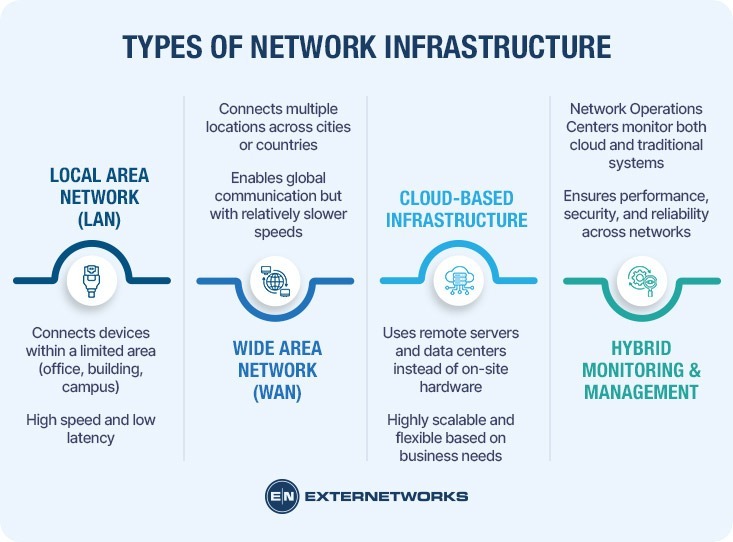
Network infrastructure isn’t one-size-fits-all—it comes in several distinct configurations, each designed for different scales and purposes. Understanding these types helps you choose the right setup for your organization’s needs.
LANs connect devices within a single building or campus, creating what’s essentially a private digital neighborhood. Your office network—linking computers, printers, and servers across a few floors—is a classic LAN. These networks offer high speeds and low latency because everything stays local. Think of a LAN as your home’s internal plumbing system: fast, efficient, and contained within one property.
When organizations need to connect multiple locations across cities or countries, WANs step in. These networks link geographically dispersed LANs, often using leased lines or internet connections. According to IBM, WANs enable global organizations to maintain seamless communication despite physical distance. However, this extended reach typically means slower speeds than LANs due to the distances data must travel.
Modern businesses increasingly adopt cloud infrastructure, where network infrastructure components like servers, storage, and applications live in remote data centers rather than on-premises. This approach offers remarkable flexibility—you can scale resources up or down based on demand without purchasing physical hardware. Network Operations Centers continuously monitor these distributed environments to ensure optimal performance across both cloud and traditional infrastructure components.
Building a robust network starts with following proven design principles that ensure reliability, scalability, and performance. These foundational guidelines help organizations avoid costly mistakes and create networks that grow alongside their business needs.
Redundancy and fault tolerance form the cornerstone of resilient network design. This means eliminating single points of failure by duplicating critical network hardware components—think backup routers, redundant switches, and multiple internet connections. When one component fails, traffic automatically reroutes through backup paths, keeping your network operational.
Scalability planning ensures your network can accommodate growth without requiring complete overhauls. Design with expansion in mind: choose modular switches that accept additional ports, implement IP addressing schemes that allow for more devices, and select routing protocols that handle increased traffic loads. A well-designed network should support at least 30% more capacity than current needs.
Security-first architecture integrates protection at every network layer rather than bolting it on afterward. This includes network segmentation to isolate sensitive data, implementing proper monitoring systems to detect threats, and designing access controls that limit who can reach critical resources. According to IBM, security considerations should inform every design decision from the ground up.
The principle of standardization simplifies management and troubleshooting. Using consistent hardware vendors, cable types, and configuration templates reduces complexity and makes training staff easier. When problems arise, your team can quickly identify and resolve issues because they’re working with familiar components.
Even with solid design principles in place, organizations frequently stumble during implementation. One of the most prevalent mistakes is underestimating future bandwidth requirements. What seems adequate today can become a bottleneck within months as business needs evolve and data demands multiply.
Another critical error involves poor documentation practices. Many teams skip thorough network mapping and configuration records during initial setup, thinking they’ll “document it later.” This oversight creates significant challenges when troubleshooting issues or planning upgrades. According to Intermapper’s infrastructure guide, incomplete documentation is among the top factors contributing to prolonged network outages.
Neglecting security from the start represents perhaps the costliest mistake. Organizations often treat security as an afterthought rather than building it into the foundation. This includes failing to segment networks properly, using default passwords on network devices, and not implementing proper access controls within network software and management systems.
Equally problematic is choosing equipment based solely on price rather than compatibility and long-term value. Mixing incompatible vendors or purchasing underpowered devices to save money typically results in higher costs down the line. Organizations also frequently overlook the importance of redundancy—not building failover capabilities into critical paths leaves them vulnerable to single points of failure.
The transition to more advanced infrastructure requires avoiding these pitfalls while staying informed about evolving security practices and emerging technologies that are reshaping how networks operate.
Managed services work by transferring responsibility for defined ongoing operations to an external service provider. The provider monitors, maintains, supports, and manages the agreed systems or business functions under a service agreement, while the customer retains responsibility for business decisions, policies, and oversight.
The process typically involves five stages, from assessing business requirements to reviewing ongoing service performance.
The managed service provider (MSP) evaluates the organization’s current environment, operational challenges, existing processes, and support requirements. This assessment identifies which activities require external management and what resources are needed to deliver them.
For example, a business experiencing frequent network disruptions may need continuous monitoring, incident response, and routine infrastructure maintenance rather than occasional technical assistance.
The business and provider agree on the services to be delivered, supported systems, operating hours, escalation procedures, and performance expectations.
The agreement should clearly identify which activities the provider manages, which decisions require customer approval, and which responsibilities remain with the internal team. This helps prevent service gaps and misunderstandings during daily operations.
During onboarding, the provider collects relevant documentation, establishes authorized access, reviews existing configurations, and implements the required monitoring and management processes.
The onboarding plan should include communication procedures, escalation contacts, knowledge transfer, and service continuity arrangements. Businesses should confirm that essential operations remain supported during the transition.
Once onboarding is complete, the provider performs the activities covered by the service agreement. Depending on the service scope, these may include:
The provider handles these activities according to agreed procedures, support coverage, and service-level commitments.
The provider shares performance reports and reviews service delivery against agreed targets. Businesses can assess incident response times, service availability, recurring issues, completed maintenance, and unresolved operational risks.
Regular service reviews help identify improvements, update operational requirements, and determine whether the service still meets business expectations.
A managed services agreement defines the services a provider will deliver, the systems and locations covered, each party’s responsibilities, and the conditions under which support is provided. It also identifies activities outside the agreed service scope that may require additional fees or separate approval.
Understanding these boundaries helps businesses evaluate service coverage, establish accountability, and avoid unexpected operational costs.
The following activities may be included, depending on the service agreement:
| Service component | What it typically covers |
|---|---|
| Monitoring | Tracking the health, availability, and performance of agreed systems |
| Incident management | Identifying, investigating, resolving, or escalating covered incidents |
| Routine maintenance | Performing scheduled maintenance, updates, and approved operational tasks. |
| Configuration management | Implementing and documenting authorized configuration changes |
| Technical support | Assisting during agreed support hours |
| Performance reporting | Sharing service metrics, incident trends, and operational reports |
| Service reviews | Evaluating performance against agreed targets and identifying improvements |
These activities are not automatically included in every managed services contract. Businesses should confirm the exact deliverables and service boundaries before signing.
Depending on the contract, the following activities may fall outside the standard service scope:
Some providers offer these activities as optional services or under separate statements of work.
Businesses should confirm which systems, applications, locations, and users the provider supports. They should also review support hours, service-level agreements (SLAs), response targets, escalation procedures, change approval requirements, and additional charges.
The agreement should establish who owns system documentation, configurations, and operational records. It should also explain how the provider will transfer responsibilities, return customer information, and revoke access when the engagement ends.
Clear contract terms help both parties understand their obligations throughout the service relationship.
Managed services, break-fix support, and project-based IT services are different approaches to obtaining external technical assistance. Managed services provide ongoing responsibility for agreed operations, break-fix support addresses specific problems when they occur, and project-based services deliver a defined outcome within an agreed timeframe.
The right model depends on whether a business needs continuous operational management, occasional troubleshooting, or assistance with a specific implementation.
Key Differences Between Managed Services, Break-Fix, and Project-Based IT
| Comparison factor | Managed services | Break-fix support | Project-based IT Services |
|---|---|---|---|
| Service approach | Ongoing operational management | Reactive problem resolution | Planned delivery of a specific project |
| Primary purpose | Maintain and support agreed operations | Resolve individual technical issues | Complete defined technical objectives |
| Engagement duration | Continuous or recurring | As needed | Limited to the project scope |
| Monitoring | May include continuous or scheduled monitoring | Usually not included | Included only when required by the project |
| Maintenance | Typically part of the agreed service scope | Performed when separately requested | Limited to project requirements |
| Provider responsibility | Defined ongoing operational responsibilities | Individual support requests | Agreed project deliverables |
| Payment model | Usually recurring service fees | Per incident or time spent | Fixed fee, milestone-based, or time and materials |
| Suitable use case | Ongoing infrastructure or service management | Occasional equipment or software issues | System migration, deployment, or upgrades |
Break-fix IT support is more appropriate for businesses that experience occasional technical issues and don’t need continuous monitoring or ongoing IT management. Instead of paying a recurring fee for managed services, businesses pay for support when a problem occurs. This approach can help control IT costs when systems are relatively stable, and the need for technical assistance is limited.
Break-fix support may be suitable in the following situations:
However, break-fix support may be less suitable for businesses that depend on continuous system availability, operate across multiple locations, or handle sensitive data. Unexpected failures can cause extended downtime, and repeated service requests may cost more than proactive support.
Businesses should use project-based IT services when they need specialized technical expertise to complete a specific task, implement a new technology, or achieve a defined IT objective within an agreed scope, budget, and timeline. Unlike ongoing managed IT services, project-based support focuses on delivering a particular outcome rather than providing continuous monitoring and maintenance.
Project-based IT services are suitable for the following situations:
Before engaging a provider, businesses should define the project scope, deliverables, milestones, budget, responsibilities, and acceptance criteria. They should also establish maintenance and support arrangements after project completion.
For example, a company deploying managed switches across five offices may hire a project-based IT team to configure VLANs, implement network policies, test connectivity, and document the final configuration. Once the deployment is complete, the company’s internal IT team or a separate managed service provider can handle ongoing monitoring and maintenance.
Project-based IT services suit defined initiatives with clear deliverables and completion dates. Businesses that need continuous monitoring, routine maintenance, and ongoing troubleshooting should consider managed IT services, while organizations with occasional, unpredictable repair needs may find break-fix support more appropriate.
The network infrastructure landscape is rapidly transforming as organizations adapt to new technologies and evolving business needs. Software-defined networking (SDN) has emerged as a game-changing approach, separating the network control plane from the data plane to enable centralized management and programmable network behavior. This shift allows administrators to orchestrate network resources dynamically rather than manually configuring individual devices.
Cloud-native infrastructure is becoming the standard for modern deployments. According to IBM, organizations are increasingly adopting hybrid and multi-cloud architectures that blend on-premises hardware with cloud services. This trend requires new approaches to infrastructure management that seamlessly span traditional and virtual environments.
Network security has evolved beyond perimeter defense to embrace zero-trust architectures. This model assumes no user or device is trustworthy by default, requiring continuous verification regardless of location. As ServiceNow notes, security must now be embedded throughout the infrastructure rather than added as an afterthought.
Edge computing represents another significant shift, pushing processing power closer to data sources. This distributed approach reduces latency for IoT devices and real-time applications while decreasing bandwidth demands on core networks. The trend signals a fundamental rethinking of where computing resources should live in modern network architectures.
Understanding how different industries deploy network infrastructure reveals the versatility and critical importance of these systems across sectors. Each industry faces unique challenges that shape their network connectivity requirements and implementation strategies.
Healthcare organizations rely on robust network infrastructure to support electronic health records (EHR), medical imaging systems, and telemedicine platforms. Hospitals typically implement redundant networks with dedicated VLANs to separate patient data traffic from administrative systems, ensuring compliance with HIPAA regulations while maintaining 24/7 uptime for critical care systems.
Financial services institutions deploy some of the most sophisticated network infrastructures, featuring ultra-low latency connections for high-frequency trading, encrypted channels for secure transactions, and multi-layered security protocols. Banks commonly use SD-WAN technology to connect hundreds of branch locations while maintaining centralized control through a centralized monitoring approach.
Manufacturing facilities increasingly depend on Industrial IoT networks that connect production equipment, sensors, and control systems. These networks often combine traditional Ethernet infrastructure with wireless protocols to support mobile devices on factory floors, enabling real-time production monitoring and predictive maintenance.
Educational institutions face the unique challenge of supporting thousands of simultaneous wireless connections across sprawling campuses. Universities typically deploy dense Wi-Fi networks with advanced access control systems to manage student, faculty, and guest access while supporting everything from classroom learning management systems to research computing clusters.
While network infrastructure provides essential connectivity for modern organizations, it comes with inherent limitations that require careful planning and ongoing attention. Understanding these constraints helps organizations make informed decisions about design, deployment, and management strategies.
Modern network infrastructure systems can become remarkably complex, particularly as organizations scale. Each additional device, connection point, and security layer introduces management challenges that demand specialized expertise. Network administrators must constantly balance performance requirements with the practical limits of their infrastructure, which often means making trade-offs between ideal configurations and operational realities. The complexity increases exponentially when integrating legacy systems with newer technologies, creating potential compatibility issues that affect data transmission efficiency.
Building robust network infrastructure requires significant upfront capital investment and ongoing operational expenses. Organizations face limitations around budget allocation for hardware upgrades, software licensing, security tools, and skilled personnel. According to IBM, many enterprises struggle to justify infrastructure investments despite their critical importance to business operations. Smaller organizations particularly feel these constraints, often forced to compromise on redundancy, monitoring capabilities, or performance capacity.
Every network component represents a potential security entry point. As data transmission becomes more distributed across cloud services and remote locations, the attack surface expands considerably. Routers, switches, and wireless access points can be exploited if not properly secured and regularly updated. However, implementing comprehensive security measures introduces its own limitations—security protocols can slow performance, complicate user access, and require constant vigilance against emerging threats.
Network infrastructure faces practical constraints from physical space, power availability, cooling requirements, and geographical distances. Data centers must account for heat dissipation, while wireless signals encounter interference from building materials and environmental obstacles. Cable lengths have maximum distances before signal degradation occurs, and fiber optic installations require careful handling to prevent damage. These physical realities often force organizations to compromise between optimal network design and what their existing facilities can accommodate.
Network infrastructure forms the foundation of modern connectivity, enabling everything from basic file sharing to complex cloud computing environments. Understanding its components—routers, switches, cables, and security devices—empowers organizations to make informed decisions about their technology investments.
The essential points to remember:
As technology continues evolving, successful organizations treat their network infrastructure as a strategic asset rather than just operational overhead. Whether you’re building your first small office network or managing enterprise-scale systems, the principles remain constant: plan thoughtfully, implement methodically, and maintain proactively.
Ready to take the next step? Consider exploring emerging trends in network operations to future-proof your infrastructure investments and stay ahead of technological shifts.
See how ExterNetworks can help you with Managed NOC Services
Contact Us