Every second, billions of data packets flow through cables, routers, and wireless access points worldwide—this constant movement of information is network traffic. When you stream a video, send an email, or load a webpage, you’re generating network traffic that travels across local networks and the broader internet. According to Cisco, understanding this data flow is fundamental to maintaining secure and efficient network operations.
At its core, network traffic consists of data packets moving between devices using network protocols. Think of it like highway traffic: individual vehicles (data packets) travel along roads (network cables and connections) to reach specific destinations (devices or servers). Each packet contains information about its origin, destination, and the actual data being transmitted.
The volume and complexity of network traffic have grown exponentially. Wikipedia notes that modern networks handle everything from simple text messages to bandwidth-intensive video conferences and cloud application synchronization. This diversity means that effective monitoring and management of network environments has become essential for businesses of all sizes.
Understanding network traffic patterns helps identify performance bottlenecks, detect security threats, and optimize resource allocation—making it a cornerstone of modern IT infrastructure management.
Network traffic isn’t a monolithic entity—data flows through networks in distinct patterns, each serving a specific purpose and requiring different handling. Understanding these categories is essential for anyone managing or troubleshooting network systems.
The three fundamental types of network traffic are unicast, broadcast, and multicast, each representing a different communication pattern. Unicast traffic operates like a private phone call, sending data from one specific device to another. Broadcast traffic works like a public announcement, where one sender transmits data to all devices on a network segment simultaneously. Multicast sits between these extremes, delivering content from one source to a selected group of recipients—think of a subscription service where only interested parties receive the information.
Beyond these transmission patterns, network traffic also breaks down into control and data traffic. Control traffic manages network operations, handling tasks like routing updates, error messages, and connection establishment. Data traffic carries the actual payload—your video streams, file downloads, and email messages. According to network topology principles, how these traffic types flow depends heavily on your network’s physical and logical structure, making traffic classification a critical first step in optimization.
Unicast is the most common form of network communication—a one-to-one transmission in which network packets travel from a single source to a specific destination. Think of it as a private conversation between two devices: when you send an email, browse a website, or download a file, unicast traffic handles the exchange.
Each unicast transmission uses a unique destination address, ensuring data reaches only the intended recipient. A laptop requesting a web page sends packets to the server’s specific IP address, and the server responds directly back to that laptop—no other devices receive this communication. This precision makes unicast ideal for data transfers that require privacy and targeted delivery.
The efficiency of unicast depends on scale. For individual communications, this method conserves bandwidth because only relevant devices process the data. However, according to TechTarget, when the same content needs to reach multiple recipients simultaneously—like streaming a company-wide presentation—unicast becomes inefficient, requiring separate streams for each viewer.
Modern networks rely heavily on unicast for everyday operations: web browsing, file transfers, SSH sessions, and API calls all use this direct communication pattern. Understanding unicast’s strengths and limitations helps network administrators optimize traffic flow and anticipate when alternative transmission methods become more appropriate.
Multicast traffic represents a one-to-many communication pattern that delivers data from a single source to multiple destinations simultaneously—without creating separate copies for each recipient. Think of it as a radio broadcast: the station transmits once, and multiple receivers tune in to the same stream.
This transmission method is particularly valuable for bandwidth-intensive applications such as video conferencing, live streaming, and software updates across corporate networks. According to VMware, multicast traffic optimizes network resources by reducing redundant data transmission. Instead of sending identical packets to each recipient individually, the network infrastructure replicates packets only where paths diverge—dramatically reducing both inbound traffic volume and outbound bandwidth consumption.
Common applications include:
The efficiency gains become most apparent in large-scale deployments—transmitting a 2GB update to 500 devices requires only 2GB of source bandwidth with multicast, versus 1TB with unicast transmission.
Understanding multicast traffic becomes essential when analyzing overall network performance metrics, particularly in bandwidth-constrained environments. However, not all network devices support multicast effectively, and its success depends heavily on router configuration, which leads us to examine how broadcast traffic differs in its network-wide communication.
Broadcast traffic is a one-to-all communication pattern in which a single device simultaneously sends data packets to every device on the same network segment. Unlike unicast’s targeted delivery or multicast’s selective distribution, broadcast reaches all connected endpoints indiscriminately—whether they need the information or not.
This outbound traffic pattern serves essential network functions, particularly during device initialization and service discovery. When a device joins a network without knowing its configuration, it broadcasts requests to locate services such as DHCP servers or to discover other devices. According to Indeed’s network traffic guide, broadcast messages are fundamental to protocols such as ARP (Address Resolution Protocol), which maps IP addresses to physical hardware addresses.
However, broadcast traffic carries inherent limitations. Every broadcast packet consumes bandwidth across the entire network segment and demands processing power from all receiving devices—even those with no interest in the message. In networks with segmented VLANs, broadcast domains remain confined to their respective segments, preventing network-wide congestion.
Modern networks minimize broadcast dependency by using switches that intelligently contain broadcast traffic within local segments, preventing the “broadcast storms” that plagued early networking infrastructure.
Unexpectedly high network traffic often signals underlying problems that demand immediate attention. Network congestion typically stems from several common culprits: bandwidth-intensive applications consuming excessive resources, malware or unauthorized devices generating unusual data flows, or insufficient infrastructure capacity for current demands. According to network traffic analysis best practices, identifying the root cause requires systematic investigation of traffic patterns and source locations.
One particularly revealing metric is north-south traffic—data flowing between your internal network and external internet resources. When this traffic spikes unexpectedly, it often indicates users streaming high-definition video, downloading large files, or cloud-based applications synchronizing data. However, it can also signal security threats, such as data exfiltration attempts.
Additional factors contributing to traffic spikes include broadcast storms, where devices repeatedly send packets across the network; outdated equipment struggling to handle modern data volumes; or misconfigured Quality of Service (QoS) settings that fail to prioritize critical traffic. What typically happens is that multiple minor issues compound simultaneously, creating performance bottlenecks that affect the entire network. Implementing active monitoring approaches helps detect these patterns before they escalate into serious disruptions.
Understanding network behavior requires systematic observation through specialized tools and methodologies. Network traffic monitoring involves capturing, analyzing, and interpreting network traffic data to maintain optimal performance and security.
Modern monitoring approaches fall into two categories: passive monitoring examines traffic without disrupting flow, while active monitoring sends test packets to measure response times. Network traffic analysis (NTA) tools, such as packet analyzers, capture raw network packets, revealing granular details about protocols, source-destination pairs, and payload content.
Organizations increasingly focus on east-west traffic—the lateral data movement between servers within data centers—which often escapes traditional perimeter-focused monitoring. This internal communication represents up to 80% of modern data center traffic, making its visibility crucial for detecting threats and optimizing resource allocation.
Dedicated NOC monitoring platforms provide centralized dashboards that aggregate metrics across distributed infrastructure. These systems track bandwidth utilization, protocol distribution, and connection states in real-time. Flow-based monitoring technologies like NetFlow and sFlow offer scalable alternatives to deep packet inspection by sampling metadata rather than capturing full payloads, balancing visibility with performance impact.
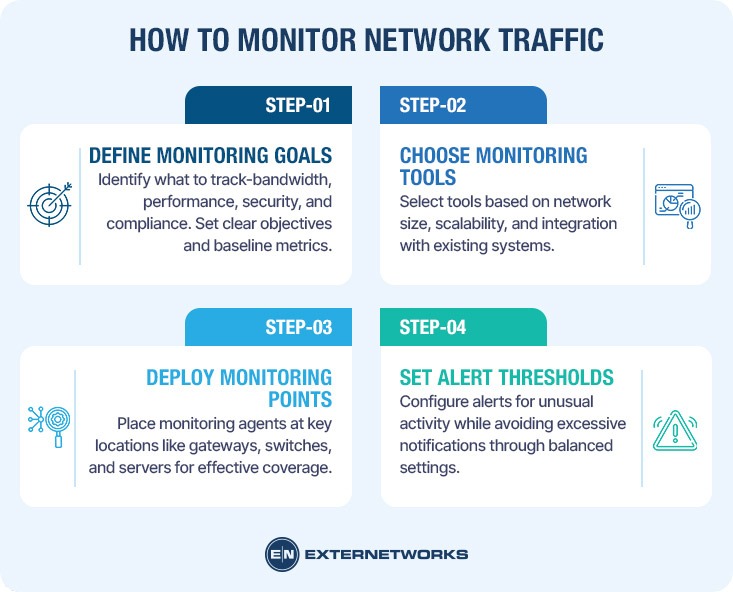
Implementing effective network monitoring requires a systematic approach that balances thoroughness with practicality. Network traffic monitoring transforms abstract data flows into actionable insights through structured observation and analysis.
Step 1: Define Your Monitoring Objectives
Begin by identifying what you need to track. Common objectives include bandwidth utilization, application performance, security threat detection, and compliance requirements. Clear objectives guide tool selection and ensure monitoring efforts align with business priorities. Document baseline metrics before implementing changes.
Step 2: Select Appropriate Monitoring Tools
Choose tools that match your network complexity and technical expertise. Solutions range from simple packet analyzers to comprehensive monitoring platforms that provide real-time visibility. Consider factors like scalability, reporting capabilities, and integration with existing infrastructure when evaluating options.
Step 3: Deploy Monitoring Points Strategically
Position monitoring agents at critical network junctions—gateways, core switches, and server connections. Strategic placement captures representative traffic samples without overwhelming resources. A typical deployment involves installing agents on 15-20% of network endpoints while monitoring 100% of critical pathways.
Step 4: Establish Alert Thresholds
Configure notifications for unusual patterns, such as sudden bandwidth spikes, unauthorized access attempts, or performance degradation. Effective thresholds balance sensitivity with practicality—too sensitive generates alert fatigue, while too lenient misses genuine issues. Start conservative and refine based on operational experience.
While network traffic analysis provides invaluable insights, understanding its constraints helps organizations set realistic expectations and allocate resources appropriately. Effective traffic analysis requires acknowledging both technical limitations and practical challenges that can impact monitoring accuracy and scope.
Encrypted traffic presents a fundamental challenge for traditional analysis methods. According to Cisco, encrypted communications—while essential for security—obscure packet contents from inspection tools, making it difficult to identify application-specific patterns or detect threats hidden within legitimate encrypted sessions. Organizations must balance privacy requirements with visibility needs.
Resource constraints significantly affect monitoring capabilities. Comprehensive traffic analysis demands substantial processing power, storage capacity, and bandwidth—especially in high-traffic environments. Virtual networking environments add complexity, requiring specialized tools that understand virtualized traffic flows.
False positives represent another practical consideration, as automated analysis systems may flag legitimate, unusual patterns as potential threats. A common pattern is that baseline anomalies—such as legitimate after-hours data transfers or one-time bulk operations—can trigger unnecessary alerts, requiring human expertise to distinguish genuine issues from expected variations.
Understanding network traffic is foundational to maintaining a secure, efficient digital infrastructure. Network traffic refers to all data moving across a network at any given time, including packets transmitted between devices, applications, and servers. This data flow enables everything from simple email exchanges to complex cloud-based operations.
Effective network traffic monitoring requires understanding traffic patterns, implementing appropriate analysis tools, and establishing baseline behaviors. Organizations benefit from monitoring by identifying performance bottlenecks, detecting security threats early, and optimizing bandwidth allocation. However, encrypted traffic, privacy considerations, and resource limitations present ongoing challenges.
The practical approach combines protocol analysis, flow monitoring, and packet inspection techniques. Whether managing a small business network or enterprise infrastructure, starting with clear monitoring objectives and gradually expanding capabilities yields the best results. Modern NOC platforms integrate these capabilities, providing centralized visibility across network operations.
As networks grow more complex with cloud services, IoT devices, and remote work demands, traffic analysis becomes increasingly critical for operational success and security posture.