SD-WAN Deployment Overview
Traditionally, companies relied on traditional WANs to provide services for their organizations. Managers soon realized that standard WANs (in conjunction with the legacy circuits they ride on) are expensive to maintain and operate. Ever since the explosion of cloud technology, traditional WANs have been struggling to keep pace with business demands. They are limited due to the fact that the data riding between locations relies on singular paths, often causing a backhaul and congesting the network. They are also non-friendly to virtualization, as network devices that have already deeply embedded into the legacy architecture force businesses to rely on proprietary hardware, adding to company expenses and limiting their flexibility.
The software-defined WANs give your organizations a way for them to expand their reach and deploy to branch offices and remote sites quickly. They do not rely on singular connections alone and are aimed to support cloud-first strategies of businesses.
Types of SD-WAN Deployment
There are two main types of SD-WAN deployments:
Cloud-Based SD-WAN
This type of solution connects multiple sites via a private IP address space, typically using a public cloud service such as Amazon Web Services, Google Cloud Platform, Microsoft Azure, or IBM SoftLayer. It provides a virtualized connection between the site and the cloud, enabling the use of common management tools and software.
Edge-Router Based SD-WAN
Edge routers connect each site to an edge router in the provider’s network. The edge router then routes traffic from one location to another through the core network. This is commonly referred to as “edge routing” because it uses the existing infrastructure rather than creating a new path.
In both cases, the SD-WAN deployment requires a secure tunnel between the cloud and the edge router. In addition, there needs to be a secure tunnel between the edge router and the site.

SD-WAN Requirements
Before transitioning to an SD-WAN, organizations would need to meet the following criteria before the WAN change is executed. Some of the typical questions that leaders should ask are:
- What applications are used most often in the network?
- Which of the applications will be given priority in the event a conflict occurs?
- What performance do users expect out of those applications?
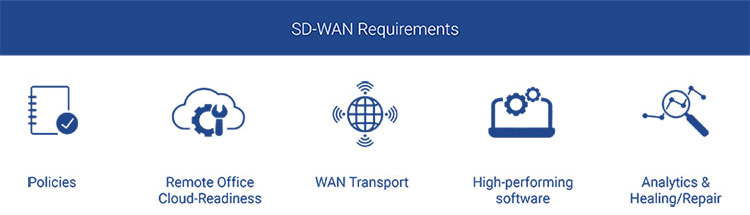
In addition to the above, companies will need to measure what their requirements for SD-WAN will be prior to installation by looking for these five particular items:
-
Policies
Traditional WANs took tremendous effort to configure and usually consisted of many low-level rules in order to meet organizational requirements. Personnel needed to be proficient in order to meet the needs of the client.
The network will need to be tailored in such a way that it responds in accordance with protocols and rule sets laid out by company policies. SD-WANs allow companies to translate complex and extensive policies to their architecture quickly and efficiently.
-
Remote Office Cloud-Readiness
Remote offices will need to be able to utilize cloud-based applications on command. Legacy networks often backhauled traffic between the corporate headquarters to its subsidiary offices through the use of multi-protocol label switching (MPLS) circuits. The networks in the traditional configuration were not prepared for the rise of numerous incoming cloud-based connections. This also highlighted the limitation of said connections due to their low bandwidth capacity.
-
WAN Transport
The SD-WAN architecture is designed to be less reliant on MPLS-based connections. The latter was relied on for decades to provide secure communications between the corporate headquarters and its subsidiary offices. The cost of maintaining and operating traditional WAN connections have become prohibitively expensive.
The software-defined architecture will need to reduce dependency on class-specific carriers and WAN data transportation. Organizations should be able to enjoy the flexibility and freedom to choose any WAN transport for each location based on SLAs, performance, requirements and pricing. They should also enjoy being able to transition from one vendor to another with little if any disruptions in service.
-
High-performing Software
Networking devices today offer computing power that’s more than half a decade behind current technologies. Most vendors design their devices in the prototype stage two years prior to production.
That being said, the technology that exists on current networks were planned to operate on a lifespan of ten years or more. The technology that was produced years ago did not anticipate the explosion of cloud technology, and will not be able to keep up with the demands of incoming connections. Legacy networks are also not designed to be friendly to virtualization, which severely inhibits a business’ ability to deploy said devices on whatever general-purpose computing hardware they opt to use.
SD-WANs should give clients the option to able to deploy networking functions on platforms that will provide form factor diversity and flexibility. Businesses must be able to leverage the advantages of discrete network devices and run the same software for those devices on virtualized hardware of their choosing. They should also have a say in the design and deployment of their IT architecture (including networking) to ensure the platforms empower them, and not serve as a hindrance to their operations.
-
Analytics and Healing/Repair
Legacy networks lack the capability to the ability to monitor applications that are hosted on them. Usually, organizations will be forced to utilize additional software that is equipped to provide monitoring capabilities for IT staff on top of the software that already exists. Unfortunately, they require a significant investment on the part of the business to purchase and acquire the servers, storage and management capability in order to gain these functions.
SD networks will also need to extend perimeter boundaries for each site – including visibility on monitoring and performance, as well as site security. The business should have a full overview of data that traverses the network without having to rely on additional servers, storage or management infrastructure. The data also needs to be granular in terms of how key applications perform on the network, giving leeway for personnel to respond quickly when problems start coming up.
SD-WANs will need to use the data collected to get a more grounded understanding of how applications are performing on the network. This will allow corrective action as necessary to ensure that security, performance, and compliance standards are met.
SD-WAN Architecture/Types
SD-WAN is catching up with businesses due to its ability to set up networks quickly and efficiently. There are three SD-WAN types that are available for use in the network environment:
-
On-prem-only/Premise-based
“On-prem-only” refers configuring traffic on-site through an SD-WAN box (a router that does plug ‘n play). While it’s able to set up quickly, it lacks the ability to connect to a cloud gateway. This box only allows your organization to connect to satellite offices and remote sites that are integrated with your intranet.
This solution is tailored for companies that don’t have any cloud applications hosted on their networks.
-
Cloud-enabled/MPLS-based
This solution utilizes an SD-WAN box on site that allows your company to connect to a virtual cloud gateway. It gives the added benefits of giving your company a premise-based configuration (circuit load-balancing/failover), as well as increased reliability and performance from your cloud-based apps. Your cloud gateway will interface directly with providers such as AWS, Salesforces, Office 365, etc.
If your circuit happens to be interrupted for any reason, the gateway can still maintain an active session. If alternate circuits are available, your cloud app will be re-directed through that alternate circuit, negating any form of interruptions entirely.
The cloud-enabled solution is geared towards companies that have cloud-heavy applications hosted within their networks.
-
Cloud-enabled plus backbone/Internet-based
This solution is tailored for large companies that use numerous real-time cloud applications. The cloud-enabled/backbone combo is an iteration of the software-defined architecture that offers a backbone connection to the vendor’s nearest point of presence (POP). Company traffic would traverse the provider’s private, network, and fiber optic backbone.
This essentially guarantees that you will experience minimal levels of packet losses and latency. Performance would improve across the board through real-time apps including virtual desktops, VoIP calls and video conferencing. The backbone also has dedicated connections to cloud providers like the cloud-enabled solution, increasing performance and reliability for cloud-based apps as well.
How Do You Monitor an SD-WAN After Deployment?
Monitoring an SD-WAN after deployment involves continuously tracking application performance, WAN connectivity, network availability, and security events across all connected locations. Organizations use centralized SD-WAN management platforms and network monitoring tools to identify performance issues, detect security threats, and maintain reliable connectivity.
An ongoing SD-WAN monitoring strategy should include the following areas.
- Monitor Application Performance: Track the performance of business-critical applications, including VoIP, video conferencing, cloud platforms, and enterprise applications. Monitor metrics such as latency, jitter, packet loss, response time, and bandwidth consumption. Use application-aware monitoring to detect performance degradation and adjust traffic routing policies as needed.
- Monitor WAN Connectivity and Link Health: Continuously monitor the status and performance of WAN connections, including broadband, MPLS, and 4G/5G links. Track bandwidth utilization, interface errors, packet drops, latency, and connection stability. Configure alerts to notify administrators about link failures, congestion, or connectivity interruptions.
- Track Network Availability and Failover: Monitor the availability of SD-WAN edge devices, controllers, tunnels, and connected branch locations. Regularly verify that redundant WAN links and automatic failover mechanisms operate as expected. Review uptime reports and failover events to identify recurring connectivity problems and potential single points of failure.
- Monitor Security Events and Threats: Track firewall alerts, unauthorized access attempts, suspicious traffic patterns, intrusion detection events, and policy violations. Integrate SD-WAN monitoring with SIEM or SOC platforms to centralize security logs and correlate events across network locations. Investigate security alerts and apply corrective measures to reduce potential threats.
- Monitor Network Traffic and Bandwidth Utilization: Analyze traffic patterns to identify bandwidth bottlenecks, unusual traffic spikes, and applications consuming excessive network resources. Review traffic distribution across WAN links and verify that application prioritization and quality of service policies are working correctly. Use these insights to optimize bandwidth allocation and plan future capacity requirements.
- Monitor SD-WAN Devices and Configuration Health: Track the operational status of edge devices, controllers, software versions, CPU usage, memory utilization, and configuration synchronization. Monitor firmware updates, configuration changes, and device authentication events. Maintain configuration backups and investigate unexpected changes to prevent network disruptions.
- Configure Alerts and Performance Reports: Establish monitoring thresholds for latency, jitter, packet loss, bandwidth utilization, device availability, and security events. Configure automated notifications through dashboards, email, or incident management systems. Generate regular performance reports to evaluate network health, identify recurring issues, and measure compliance with service-level agreements (SLAs).
SD-WAN Monitoring Metrics
| Monitoring Area | Key Metrics | Purpose |
|---|---|---|
| Application performance | Latency, jitter, packet loss, response time | Maintain application quality |
| Connectivity | Link status, tunnel status, interface errors | Identify connection failures |
| Availability | Uptime, device availability, failover events | Ensure network continuity |
| Security | Firewall alerts, intrusion events, access violations | Detect and investigate threats |
| Bandwidth | Utilization, throughput, traffic volume | Identify congestion and capacity needs |
| Device health | CPU, memory, firmware, configuration status | Maintain device stability |
What Security Requirements Should Be Considered When Deploying SD-WAN?
Security is a critical consideration when deploying SD-WAN because the technology connects branch offices, data centers, remote users, and cloud environments over multiple network paths. Organizations must implement appropriate security controls to protect data in transit, prevent unauthorized access, isolate sensitive network traffic, and detect potential threats.
Consider the following security requirements during SD-WAN deployment:
- Data Encryption: Ensure that all data transmitted between SD-WAN edge devices, branch offices, data centers, and cloud environments is protected using strong encryption. Implement IPsec VPN tunnels or other supported secure tunneling protocols to prevent unauthorized interception. Use secure encryption algorithms, appropriate key management, and regular certificate rotation to maintain data confidentiality and integrity.
- Network Segmentation: Separate network traffic based on departments, applications, user groups, and security requirements. Use virtual routing and forwarding (VRF), VLANs, or software-defined segmentation to isolate sensitive workloads and restrict unnecessary communication between network segments. This helps contain security incidents and prevents unauthorized access to critical business resources.
- Access Controls and Authentication: Implement role-based access control (RBAC) to restrict access to SD-WAN management platforms, controllers, and edge devices. Require multi-factor authentication (MFA) for administrators and privileged users. Use centralized identity management, strong password policies, and certificate-based device authentication to ensure that only authorized users and trusted devices can access the network.
- Firewall Integration: Integrate SD-WAN with next-generation firewalls (NGFWs) or cloud-delivered security services to inspect network traffic and enforce security policies. Configure firewall rules, access control lists, intrusion prevention, and application filtering to block malicious traffic. Ensure consistent security policy enforcement across branch offices, data centers, and cloud environments.
- Threat Detection and Monitoring: Implement continuous threat monitoring to identify suspicious network activity, malware, unauthorized access attempts, and potential security breaches. Integrate SD-WAN monitoring with security information and event management (SIEM) platforms or security operations center (SOC) tools. Use intrusion detection and prevention systems (IDS/IPS), security alerts, and centralized log analysis to support timely threat investigation and response.
- Secure Device Management: Protect SD-WAN edge devices and controllers against unauthorized access and configuration changes. Disable unused services and management interfaces, apply firmware and security updates regularly, and use secure management protocols. Maintain configuration backups and monitor administrative activities to identify unauthorized changes.
- Cloud and Remote Access Security: Ensure secure connectivity between SD-WAN infrastructure, cloud applications, and remote users. Implement secure access policies, identity verification, and encrypted connections. Integrate with Secure Access Service Edge (SASE) or Zero Trust Network Access (ZTNA) solutions where appropriate to extend consistent security controls beyond traditional network boundaries.
- Security Policy Enforcement and Compliance: Establish consistent security policies across all SD-WAN locations and verify that they meet organizational and regulatory requirements. Conduct periodic security assessments, vulnerability scans, configuration reviews, and compliance audits. Define incident response procedures and update security policies as network requirements evolve.
Choosing the Right SD-WAN Solution
Today, SD-WAN is a hot topic among IT professionals. This technology allows companies to create virtual networks that span across multiple locations.
It’s been said that SD-WAN will help businesses cut costs while improving performance. However, there are many factors that need to be considered when choosing between the different SD-WAN solutions.
For example, if you’re looking at the cloud-enabled solution then you’ll want to consider how much bandwidth you need. How many users do you plan to host? What type of applications do you plan to run? Do you already have a cloud service provider in place or are you planning to build one into your network?
How Much Bandwidth Do You Need?
To get started, you should know what kind of bandwidth you require. For example, if you’re using a cloud service provider, they may provide you with a certain amount of data transfer per month. You’ll want to make sure this number meets your needs before purchasing hardware.
You also need to decide if you want to go with a hybrid model or not. In a hybrid model, you’d have both on-premise and cloud-based components. A hybrid model provides more flexibility since it lets you choose whether you want to utilize the local resources or the remote ones.
What Type of Applications Will You Run?
When deciding which SD-WAN solution to deploy, you’ll want to take note of the applications you plan to run. For example, if your business relies heavily on virtual desktop infrastructure then you’ll want to look at the cloud-enabled option.
How Many Users Do You Plan to Host?
As mentioned earlier, you’ll want to determine how many users you plan to host. Depending on the application you’re running, you may need to purchase additional servers to accommodate your growing user base.
Do You Already Have A Cloud Service Provider In Place Or Are You Planning To Build One Into Your Network?
Depending on your current situation, you might already have a cloud service in place. If so, you’ll want to check out the cloud-enabled solution.
What Type of Applications Do You Plan to Run?
If you’re planning to run specific types of applications, such as virtual desktops, you’ll want to ensure the SD-WAN solution can support them.
How Can ExterNetworks Help?
ExterNetworks Managed Services can help you manage your network infrastructure effectively. We offer complete IT solutions, including network design, implementation, support, maintenance, and management. Our team of experts provides 24/7 technical support and ensures that all your IT needs are met.
We provide the following services:
Network Design & Implementation
Our expert engineers will design your network infrastructure according to your business requirements. They will also implement your network infrastructure using the latest technologies.
Network Support & Maintenance
Our technicians will monitor your network infrastructure regularly to ensure its proper functioning. They will resolve any issues as soon as they arise.
Network Management
Our experienced professionals will manage your network infrastructure efficiently. They will perform routine tasks such as patching, upgrading, monitoring, etc.
Cloud Solutions
Our cloud computing experts will assist you in migrating your data to the cloud. They will also help you in setting up your own private cloud environment.