Missed alerts turn into outages, outages turn into lost revenue. ExterNetworks Inc. delivers 24/7 NOC & Help Desk support to keep everything running smoothly.
Get 24/7 IT Support NowWhen your company’s email server crashes or employees can’t access critical applications, the support tier structure determines who solves the problem and how quickly. This multi-level approach organizes IT professionals by technical expertise, with each tier handling progressively complex issues—from password resets at the front line to infrastructure failures requiring deep system knowledge. Understanding these distinctions helps businesses optimize their service delivery and ensures technical problems reach the right specialist without unnecessary delays or escalations.
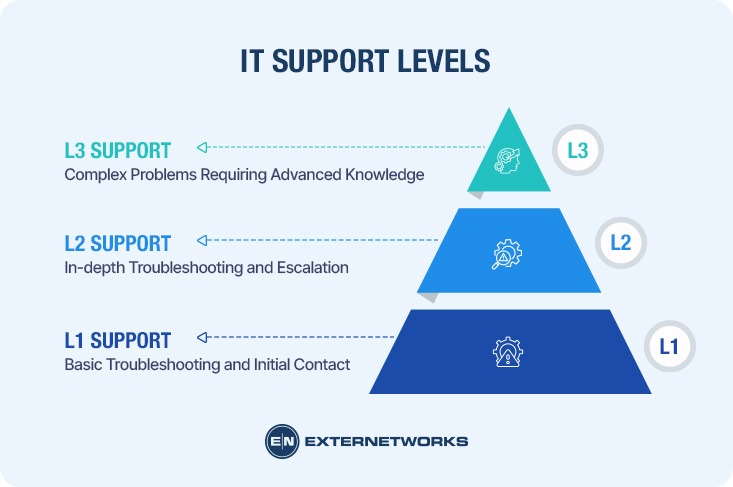
The IT support tier structure follows a clear escalation model:
This hierarchy mirrors ITIL principles that standardize incident management across organizations. Each level requires progressively specialized knowledge—while L1 technicians need strong communication skills and broad basic knowledge, L3 engineers possess advanced certifications and development capabilities. The structure ensures issues reach the appropriate expertise level quickly, reducing resolution time and preventing resource bottlenecks.
Grasping the IT support tier support structure isn’t just administrative housekeeping—it’s fundamental to operational efficiency. When teams know exactly which tier handles what, ticket resolution speeds up by 30-40% according to industry implementations. Clear tier definitions prevent bottlenecks where simple password resets languish in senior engineer queues while complex network failures wait behind routine requests.
Organizations without defined support levels face predictable chaos: specialists waste time on basic troubleshooting, customers get transferred repeatedly, and nobody owns accountability for resolution. A well-structured multi-channel support approach ensures requests land at the right expertise level immediately, reducing mean time to resolution and preventing costly escalation delays. This framework also protects your business from the hidden cost of misallocated talent—when your most expensive engineers spend half their day resetting passwords instead of architecting solutions.
Technical support serves as the operational backbone connecting end users with functional technology systems. Rather than simply answering questions, IT support tier teams actively maintain business continuity by diagnosing issues, implementing solutions, and preventing future disruptions across an organization’s IT infrastructure.
Service desk operations translate complex technical problems into actionable resolutions. Support professionals bridge the gap between sophisticated IT systems and users who need those systems to perform daily tasks—whether that’s processing transactions, accessing critical data, or collaborating across departments.
The financial impact proves significant: transforming IT helpdesk operations can reduce ticket resolution times by up to 30% while improving first-contact resolution rates. However, this efficiency depends entirely on proper tier alignment—assigning the right expertise to each issue type creates measurable improvements in both speed and accuracy.
Beyond reactive troubleshooting, technical support teams identify recurring patterns that signal larger infrastructure problems, documentation gaps, or training needs. This intelligence-gathering function transforms support from a cost center into a strategic asset that drives operational improvements across the organization.
Not every organization requires a multi-tiered structure—but most benefit from one. Smaller teams with straightforward tech stacks might manage effectively with generalist support staff who handle everything from password resets to server configurations. However, as organizations scale beyond 50-100 users or introduce complex infrastructure, the limitations of a flat structure become apparent: ticket backlogs grow, specialists waste time on routine requests, and critical issues languish in queue.
Tiered support creates natural efficiency through specialization. When routine inquiries bypass senior engineers, companies reduce resolution costs and preserve expertise for genuinely complex problems. Consider a structured approach to incident management—IT support tiers examples include retail chains where Tier 1 handles point-of-sale password resets while Tier 3 architects address payment gateway failures, or healthcare systems where frontline agents manage printer issues while specialized teams secure HIPAA-compliant databases.
The necessity question ultimately hinges on measurable pain points: Are high-level staff consumed by basic requests? Do unresolved tickets accumulate? Organizations experiencing either symptom typically see immediate value from tiering their support structure.
The three-tier framework organizes technical support based on problem complexity and required expertise. Tier 1 handles initial contact and resolves straightforward issues like password resets or basic software questions. When problems exceed their scope—network outages, application bugs, or system errors—escalation moves to Tier 2, where specialists dig deeper into diagnostics and configuration.
Tier 3 represents the highest level of technical expertise, typically involving engineers who architect solutions, develop custom code, or redesign infrastructure. What separates these tiers isn’t just skill level but the nature of problems each addresses. Tier 1 resolves known issues using established procedures. Tier 2 troubleshoots complex scenarios requiring investigation. Tier 3 tackles unprecedented challenges demanding advanced technical knowledge.
This structure appears frequently in discussions about IT support tiers on Reddit, where professionals debate whether rigid tier divisions still serve modern organizations. Some companies blur these lines with hybrid roles, while others maintain strict separation. The right approach depends on ticket volume, technology complexity, and team size—factors automation strategies can help optimize across all tiers.
Tier 0 support sits before the traditional IT support tiers list, representing self-service resources that empower users to resolve issues independently. This layer includes knowledge bases, FAQs, automated chatbots, and interactive troubleshooting guides that address common problems without human intervention.
Effective Tier 0 implementation reduces ticket volume by 30-40% according to successful IT support implementations, allowing technical staff to focus on complex issues. Password resets, software installation instructions, and connectivity troubleshooting are typical Tier 0 solutions.
Organizations should invest in searchable documentation and AI-powered assistance that provides instant answers. However, Tier 0 must seamlessly escalate users to Tier 1 when self-service fails—poor transition points create frustration rather than efficiency. The goal is empowerment, not deflection: users should feel supported, not abandoned to navigate confusing documentation alone.
Tier 1 support serves as the initial contact point between users and IT services, functioning as the organization’s frontline defense against service disruptions. This layer handles the majority of incoming requests—typically 70-80% of all support tickets—by addressing common issues like password resets, account unlocks, and basic software troubleshooting.
The primary responsibility of Tier 1 extends beyond simple problem resolution. These technicians triage incoming requests, categorize issues according to ITIL incident management practices, and route complex problems to specialized teams. This filtering function ensures that higher-tier technicians focus on issues requiring advanced expertise rather than routine tasks.
From a business perspective, effective Tier 1 support directly impacts operational efficiency and cost management. Organizations implementing structured ITIL support levels report significant improvements in first-contact resolution rates and reduced escalation volumes. A well-trained frontline team reduces overall support costs while maintaining user satisfaction through quick responses.
However, Tier 1’s effectiveness depends on proper knowledge management systems and clear escalation protocols. Without comprehensive documentation and decision trees, frontline technicians struggle to resolve issues consistently—leading to frustrated users and overwhelmed senior staff.
Tier 2 support represents the intermediate support level where complex technical issues escalate after Tier 1 resolves simpler requests. These specialists possess deeper technical knowledge and handle problems requiring advanced troubleshooting, configuration changes, or multi-system coordination.
Tier 2 technicians typically manage issues like network connectivity problems, software conflicts, and hardware diagnostics. However, they still operate within defined boundaries—when issues involve core infrastructure, custom development, or architectural changes, escalation to Tier 3 becomes necessary.
The escalation pathway creates natural efficiency: Tier 2 teams can often implement solutions that would bog down higher-tier resources. By maintaining clear handoff protocols with structured ITIL practices, organizations ensure issues reach the appropriate expertise level without unnecessary delays or repeated explanations.
Tier 3 support represents the highest level of technical expertise within the support hierarchy, handling the most complex issues that require deep system knowledge and architectural understanding. These specialists possess advanced certifications and typically command a significantly higher level salary than their Tier 1 and Tier 2 counterparts, reflecting their critical role in resolving sophisticated technical challenges.
Tier 3 engineers tackle system-wide failures, design flaws, and issues requiring code-level intervention or infrastructure changes. Unlike lower tiers that follow established procedures, these experts create solutions from scratch, often collaborating with software developers and network architects. They perform root cause analysis on recurring problems, implement permanent fixes, and maintain the organization’s most critical systems. In practice, Tier 3 professionals spend considerable time on proactive optimization rather than reactive support—identifying vulnerabilities before they escalate into service-disrupting incidents.
These senior technicians also serve as knowledge architects, documenting complex solutions and training lower-tier staff on emerging technologies. Organizations implementing enterprise-grade monitoring systems often rely on Tier 3 expertise to configure advanced automation and establish escalation protocols that keep critical operations running smoothly around the clock.
| Feature | Tier 0 (Self-Service) | Tier 1 | Tier 2 | Tier 3 |
|---|---|---|---|---|
| Primary Role | User-driven resolution | First-line support | Technical escalation | Expert-level resolution |
| Response Type | Automated/immediate | Real-time human interaction | Scheduled follow-up | Deep investigation |
| Issue Complexity | Common, repetitive | Basic troubleshooting | Moderate technical | Complex/critical |
| Resolution Time | Seconds to minutes | 5-15 minutes | Hours to days | Days to weeks |
| Technical Skills | N/A (automated) | Basic IT knowledge | Specialized training | Advanced certifications |
| Escalation Authority | Auto-routes unresolved | Routes to Tier 2 | Routes to Tier 3 | Engages vendors/developers |
| Typical Tools | Knowledge bases, chatbots | Ticketing systems, remote access | Diagnostic software, testing tools | Development environments, monitoring platforms |
| User Interaction | Self-guided | High-touch, conversational | Moderate, technical dialogue | Minimal, focused communication |
| Success Metric | Deflection rate | First-contact resolution | Escalation resolution rate | Problem elimination rate |
This IT support level framework ensures each tier operates within its expertise zone. Organizations implementing AI-driven event correlation often see clearer tier boundaries, as automated systems handle routine patterns while human experts focus on anomalies requiring judgment and creativity.
Tier 0 support acts as the first line of defense, intercepting common issues before they ever reach human agents. Self-service portals, knowledge bases, and AI-powered chatbots handle routine requests like password resets, software downloads, and basic troubleshooting—tasks that would otherwise consume valuable time from Tier 1 and Tier 2 teams.
A common pattern in successful implementations shows that 30-40% of incoming tickets can be resolved through self-service channels. This deflection directly translates to reduced queue times and allows higher tiers to focus on complex problems requiring genuine expertise. Case studies of successful IT support implementations demonstrate how automated solutions streamline operations while maintaining service quality.
The financial impact extends beyond efficiency. When routine tickets bypass human interaction, organizations can optimize staffing levels across all tiers. Support teams spend less time on repetitive tasks and more on value-added activities—which justifies the support level and salary differences between tiers by ensuring specialized talent focuses on appropriately complex work. What typically happens is that Tier 2 and Tier 3 engineers gain more time for proactive system improvements rather than reactive troubleshooting.
However, effective Tier 0 requires ongoing maintenance. Knowledge bases must stay current, and chatbot training needs regular updates to remain accurate. Organizations should view self-service not as a replacement for human support, but as a complementary layer that elevates the entire support structure. The key lies in striking the right balance between automation and human expertise.
Choosing the right support level depends on issue complexity, business impact, and resource availability. Organizations typically route requests based on predefined criteria that match problem severity with appropriate expertise.
Start by assessing the technical depth required. Password resets and basic account access belong at Tier 1, while network configuration issues demand Tier 2 or Tier 3 intervention. A practical approach is establishing clear escalation triggers—if Tier 1 can’t resolve within 15 minutes, escalate immediately.
Consider cost implications when structuring support tiers. IT support level and salary differences are significant: Tier 1 technicians typically earn $35,000-$50,000 annually, while Tier 3 specialists command $80,000-$120,000+. Routing issues correctly prevents expensive resources from handling routine tasks, maximizing ROI on specialized talent.
Business impact should drive priority assignment. System-wide outages affecting revenue automatically trigger Tier 3 engagement, regardless of apparent simplicity. However, individual workstation issues—even complex ones—may progress through standard escalation paths unless they impact critical operations.
The most effective support structures use automated triage systems that categorize requests by keywords and symptoms before human review. This ensures consistency and reduces the bottleneck of manual sorting while maintaining flexibility for edge cases that require immediate expert attention.
Tier 1 and Tier 2 support function as collaborative partners, not isolated silos. When Tier 1 agents encounter issues beyond their scope, they escalate to Tier 2 while providing detailed context from initial troubleshooting attempts. This handoff includes symptom descriptions, steps already attempted, and relevant user details—eliminating duplicate diagnostics and accelerating resolution times.
The collaboration proves most effective in tier-based environments when Tier 2 specialists also serve as mentors. A successful IT helpdesk transformation demonstrated how Tier 2 engineers conducted regular knowledge-sharing sessions with frontline staff, reducing escalation rates by expanding Tier 1’s capability range. This feedback loop continuously refines first-contact resolution parameters.
Communication channels between tiers determine workflow efficiency. Most organizations use ticketing systems with escalation protocols that automatically route cases based on keywords, time-in-queue thresholds, or complexity flags. However, the most effective teams supplement automated routing with direct messaging platforms where Tier 1 can quickly consult Tier 2 for guidance without formal escalation—resolving borderline cases faster while building institutional knowledge across both levels.
Tier 2 support tackles multi-layered technical problems that require specialized knowledge beyond standard troubleshooting. These include persistent network connectivity failures, application integration errors, permission and access rights conflicts, and recurring system performance degradation that impacts multiple users.
Common tiers examples include escalated VPN authentication failures requiring certificate validation, database connection timeouts needing query optimization, and email routing problems involving DNS record corrections. Tier 2 agents also handle software compatibility conflicts between enterprise applications, investigate abnormal security alerts that may indicate configuration issues rather than threats, and resolve printing errors tied to driver conflicts across different operating systems.
The defining characteristic is that these issues demand diagnostic depth. However, they stop short of requiring source code modifications, server hardware replacement, or architectural redesigns—those escalate to Tier 3. Tier 2’s sweet spot is applying advanced technical knowledge to problems that have known solutions but require expertise to identify and implement correctly.
The ITIL (Information Technology Infrastructure Library) framework standardizes how organizations structure support tiers by defining clear processes, responsibilities, and escalation paths. Originally developed by the UK government, ITIL has become the global benchmark for IT service management, providing a systematic approach to incident resolution that aligns Tier 1, Tier 2, and Tier 3 functions.
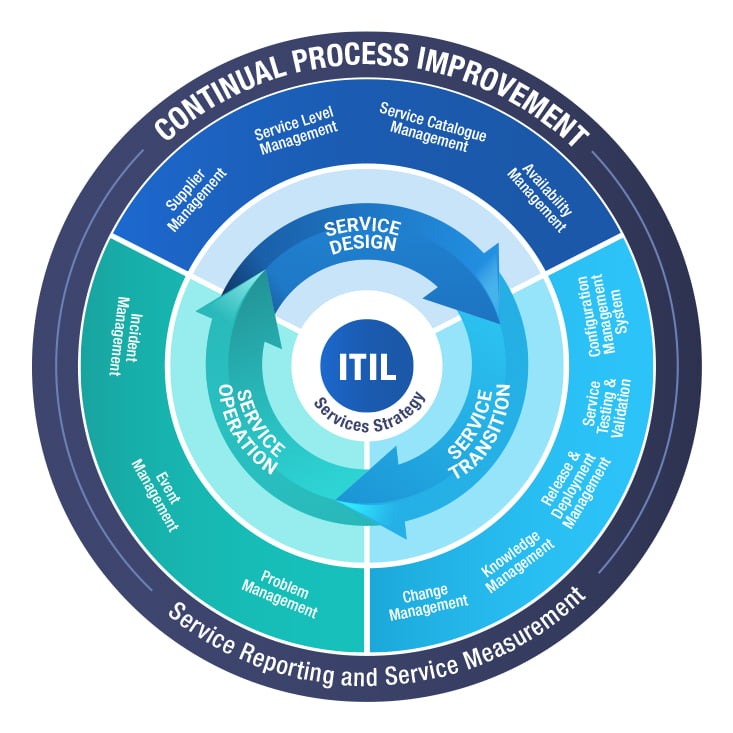
ITIL emphasizes continuous service improvement through structured workflows. The model categorizes incidents by complexity and assigns them to appropriate tiers based on required expertise. This prevents bottlenecks where advanced engineers waste time on routine requests while critical issues languish in basic queues.
Service level agreements (SLAs) form ITIL’s operational backbone, establishing response times and resolution targets for each tier. Organizations using ITIL-compliant structures report more predictable outcomes because every team member understands their escalation triggers and handoff protocols. However, ITIL requires disciplined documentation—without proper ticketing hygiene, the framework’s benefits diminish rapidly.
A public services consulting firm streamlined ticket handling by implementing a tiered support model, reducing resolution times by 35% within six months. Tier 1 agents handled password resets and access requests, while Tier 2 specialists managed VPN configuration issues and software conflicts. This clear division allowed the organization to scale support without proportionally increasing headcount.
In the restaurant industry, a signage company deployed a three-tier structure to support 1,200+ locations. Tier 1 addressed basic connectivity problems and display reboots remotely. When a location experienced persistent network failures affecting point-of-sale systems, Tier 2 technicians diagnosed router misconfigurations and coordinated with network vendors. Complex infrastructure upgrades requiring on-site hardware replacement escalated to Tier 3 field engineers.
The pattern across successful IT support implementations shows that proper tier segregation improves first-contact resolution rates while preventing specialist teams from drowning in routine requests. One financial services firm reported that 67% of tickets resolved at Tier 1 after implementing structured knowledge bases and decision trees—freeing senior engineers to focus on security audits and compliance projects rather than account unlocks.
Each support tier demands distinct technical capabilities and industry credentials. Tier 1 technicians typically hold CompTIA A+ or ITIL Foundation certifications, focusing on communication skills, basic troubleshooting methodologies, and proficiency with ticketing systems. These foundational credentials validate competence in password resets, software installations, and initial diagnostics.
Tier 2 specialists advance with CompTIA Network+, Microsoft Certified Solutions Associate (MCSA), or Cisco Certified Network Associate (CCNA) certifications. They require deeper knowledge of operating systems, network protocols, and scripting languages like PowerShell or Python. Strong analytical thinking becomes essential—the ability to dissect complex problems that stumped first-level support.
Tier 3 engineers command premium certifications: Cisco Certified Internetwork Expert (CCIE), Red Hat Certified Architect, or specialized AWS/Azure credentials. These professionals demonstrate expertise in system architecture, database administration, and advanced security protocols. What distinguishes top-tier talent is strategic problem-solving ability—connecting isolated incidents to systemic infrastructure weaknesses before they cascade into outages.
Quantifying support tier performance requires tracking distinct metrics at each level. For Tier 1, first-contact resolution (FCR) rate—the percentage of tickets resolved without escalation—typically ranges from 60-80% in high-performing teams. Average handle time (AHT) measures efficiency per interaction, with industry benchmarks around 5-10 minutes for basic issues.
Tier 2 teams focus on escalation resolution rate and mean time to resolution (MTTR), which tracks how quickly escalated tickets reach closure. A successful IT helpdesk transformation demonstrated how proper tiering reduced resolution times by 40% through clear metric tracking.
Customer satisfaction (CSAT) scores apply across all tiers but vary in context—Tier 1 measures immediate response quality, while Tier 3 evaluates resolution complexity and communication during extended engagements. Ticket volume trends and escalation patterns reveal structural issues: consistently high escalation rates may indicate insufficient Tier 1 training or unclear triage protocols.
For leadership, cost per ticket by tier provides financial visibility—Tier 1 handles volume economically, while Tier 3’s higher labor costs demand careful resource allocation. Tracking these metrics collectively ensures each tier operates at optimal efficiency while maintaining service quality standards.
Understanding metric definitions ensures accurate performance assessment across support tiers. First-contact resolution (FCR) measures the percentage of tickets resolved during the initial interaction without escalation—directly reflecting Tier 1 efficiency and knowledge base quality. Average handle time (AHT) tracks the mean duration from ticket opening to closure, revealing workflow efficiency while avoiding the trap of rewarding rushed, incomplete resolutions.
Mean time to resolution (MTTR) differs from AHT by measuring elapsed calendar time rather than active work time, making it particularly valuable for tracking Tier 2 and Tier 3 complex issues that require extended investigation periods. Customer satisfaction score (CSAT) typically uses post-interaction surveys to gauge user experience, while escalation rate calculates the proportion of tickets requiring higher-tier intervention—a critical indicator of knowledge transfer effectiveness and skill gaps.
These metrics work interdependently: optimizing FCR without monitoring AHT can encourage corner-cutting, while focusing solely on MTTR may overlook customer communication quality. Balanced scorecards that weight multiple KPIs provide the clearest picture of support tier health and improvement opportunities.
The swarming model challenges traditional tiered support by bringing multiple experts to a problem simultaneously rather than escalating sequentially. In this collaborative approach, a cross-functional team—potentially including Tier 1 agents, specialists, developers, and subject matter experts—works together in real-time to resolve complex issues. This contrasts sharply with the linear progression of tiered support, where tickets move from one level to another in a structured hierarchy.
Swarming excels for high-priority incidents requiring diverse expertise. When a critical system outage affects multiple departments, a swarm can diagnose root causes faster by pooling knowledge from network specialists, application developers, and security analysts simultaneously. However, this model demands significant organizational maturity—teams need robust collaboration tools, clearly defined swarming triggers, and cultural willingness to abandon rigid role definitions.
Tiered support remains more efficient for predictable, high-volume scenarios. Organizations handling thousands of routine password resets, account unlocks, and software installation requests benefit from the specialization and scalability that tiers provide. The key is recognizing when each model fits: use swarming for unprecedented or business-critical incidents, and maintain tiered structures for reproducible workflows. Some organizations implement hybrid approaches, reserving swarming capacity for escalations that stall in traditional tiers or affect mission-critical operations requiring immediate cross-functional attention.
Automation and AI implementation varies significantly across support tiers, with each level requiring different technological approaches to maximize efficiency. At Tier 1, chatbots and virtual agents handle password resets, account unlocks, and common software questions—tasks that follow predictable patterns and require minimal judgment. A transformation case study from a public services firm demonstrated that AI-powered initial triage reduced first-contact handling time by 34%, allowing human agents to focus on issues requiring empathy and context.
Tier 2 benefits from predictive analytics that identify recurring problems before they escalate. Machine learning algorithms analyze historical ticket patterns to suggest solutions, while automated diagnostic scripts collect system logs and configuration data during ticket creation. However, the investigative nature of Tier 2 work limits full automation—complex troubleshooting still requires human pattern recognition and creative problem-solving.
Tier 3 leverages AI differently, using it for code analysis, security threat detection, and capacity planning rather than ticket resolution. Advanced systems monitor infrastructure health and predict potential failures, allowing specialists to address issues proactively. The key distinction: Tier 1 automation replaces routine tasks entirely, Tier 2 automation augments technical investigation, and Tier 3 automation provides strategic intelligence for expert decision-making. Organizations implementing tiered automation typically see 40-60% reduction in Tier 1 volume, which paradoxically increases the complexity of remaining tickets.
IT Service Management (ITSM) platforms serve as the backbone connecting all support tiers, enabling ticket routing, knowledge sharing, and performance tracking across the organization. Modern ITSM tools like ServiceNow, Jira Service Management, and Zendesk automatically classify incoming requests and route them to the appropriate tier based on predefined rules, keywords, and historical patterns.
Effective integration requires consistent data structures across tiers. When Tier 1 agents capture standardized information during initial contact—including categorization, priority levels, and troubleshooting steps already attempted—escalations to higher tiers become seamless and context-rich. This prevents the frustrating experience of customers repeating their issues multiple times.
The knowledge base within ITSM platforms particularly benefits all tiers. Tier 1 agents reference solution articles during live interactions, Tier 2 specialists contribute new documentation from resolved escalations, and Tier 3 engineers validate technical accuracy. Technical Support (IT) Case Studies and Capstone programs demonstrate how unified knowledge management improves first-contact resolution rates by ensuring every tier accesses the same vetted information.
Workflow automation within ITSM tools reduces manual handoffs between tiers. Automated escalation triggers based on ticket age, customer VIP status, or specific keywords ensure critical issues reach specialized teams quickly. Meanwhile, SLA tracking dashboards provide real-time visibility into response times and resolution metrics for each tier, enabling proactive capacity planning and identifying process bottlenecks before they impact customer satisfaction.
Understanding the financial implications of each support tier enables organizations to allocate budgets strategically and identify opportunities for cost optimization. Tier 1 represents the highest volume but lowest per-incident cost, with personnel expenses typically ranging from entry-level to mid-range salaries depending on geography and industry. Organizations often staff this tier heavily to handle the consistent influx of routine requests, making labor the primary cost driver.
Tier 2 costs increase substantially due to specialized knowledge requirements and lower ticket volumes per agent. While Tier 2 handles fewer incidents overall, the complexity and time investment per issue drive up the average resolution cost—often 3-5 times higher than Tier 1 on a per-ticket basis. However, this investment prevents costly escalations and reduces cumulative resolution time across the organization.
Tier 3 represents the highest per-incident cost but typically handles the smallest percentage of total tickets. Senior engineers or specialists command premium salaries, and the intricate nature of their work means extended resolution timelines. What makes this tier economically viable is its role in preventing catastrophic failures and enabling innovations that reduce future support burden. Organizations must balance the expense of maintaining in-house Tier 3 expertise against the risks of vendor dependencies or consultant fees.
The most significant cost consideration across all tiers is the balance between automation investment and personnel expenses. Implementing AI-driven solutions at Tier 1 requires upfront capital but can reduce staffing needs by 20-40% over time, while Tier 2 automation focuses on diagnostic tools that accelerate resolution rather than replacement of human expertise.
Security and compliance obligations distribute across support tiers based on access levels and technical capabilities, with each tier playing a distinct role in protecting organizational assets. Tier 1 analysts enforce basic security protocols—verifying user identities through multi-factor authentication, recognizing phishing attempts, and following password reset procedures that prevent social engineering attacks. They serve as the first line of defense, flagging suspicious requests before escalation.
Tier 2 engineers manage more complex compliance requirements, including data handling procedures for GDPR, HIPAA, or PCI-DSS environments. They implement security patches, configure access controls, and ensure system changes align with organizational security policies. This tier also documents incidents according to compliance frameworks, maintaining audit trails that demonstrate regulatory adherence.
Tier 3 specialists oversee enterprise-wide security architecture and compliance strategy. They establish security baselines, conduct vulnerability assessments, and coordinate with dedicated security teams during breaches. However, organizations must clearly define boundaries between IT support and cybersecurity functions to avoid confusion—Tier 3 handles infrastructure security and compliance documentation, while dedicated security operations centers (SOCs) manage threat hunting and incident response.
A common pattern is implementing role-based access controls (RBAC) that limit each tier’s permissions to what they need for their responsibilities. This principle of least privilege reduces attack surface while ensuring analysts can still resolve issues efficiently. Cross-tier security training reinforces this framework, helping all support levels recognize their part in maintaining both security posture and regulatory compliance.
The traditional tiered support model is evolving rapidly as artificial intelligence, automation, and self-service technologies reshape how organizations deliver technical assistance. AI-powered chatbots and virtual agents increasingly handle routine Tier 1 inquiries, while machine learning algorithms predict issues before users report them. Organizations implementing AI in service desk operations report significant reductions in ticket volume and faster resolution times.
Another significant trend involves blurring boundaries between support tiers—hybrid technicians who can handle both basic troubleshooting and specialized tasks are becoming more valuable than strictly siloed roles. Remote work acceleration has also driven demand for cloud-based support platforms that enable seamless collaboration across all tiers, regardless of physical location.
The rise of proactive support represents a fundamental shift from reactive problem-solving. Tier 3 specialists now spend more time on predictive analytics and continuous improvement rather than firefighting critical incidents. Organizations are also exploring “swarming” methodologies where multidisciplinary teams collaborate on complex issues simultaneously, rather than escalating through traditional hierarchical tiers. These innovations point toward more fluid, intelligent support structures that balance automation efficiency with human expertise.
The most common questions about IT support tiers revolve around distinguishing between support levels, understanding career progression, and determining when to escalate issues. These questions reflect the practical challenges organizations face when implementing or optimizing their support structures.
Many professionals wonder whether their existing support structure aligns with industry standards. A properly designed tiered support system should reduce resolution time by 30-40% compared to unstructured support approaches, according to operational data from enterprise implementations. The key lies in understanding how technical complexity, resource allocation, and escalation triggers interact across different tiers.
Organizations frequently ask about the optimal balance between self-service capabilities and human support. The answer depends on your specific user base and technical environment. Companies with robust knowledge bases and AI-powered chatbots can resolve 40-60% of common issues before they reach human agents, freeing Tier 1 teams to focus on problems requiring personalized attention.
Another recurring question concerns the financial implications of each tier. While Tier 1 support typically costs $25-35 per resolved ticket, Tier 3 specialists may cost $150-250 per ticket due to their advanced expertise and longer resolution times. Understanding these economics helps organizations make informed decisions about which issues warrant immediate escalation versus extended troubleshooting at lower tiers.
The core difference lies in complexity, expertise, and scope of responsibility. Tier 1 handles routine issues like password resets and basic troubleshooting—problems resolved through established procedures. Tier 2 tackles technical issues requiring deeper knowledge, such as software conflicts or network configuration. Tier 3 addresses complex, often unique problems involving system architecture, custom development, or infrastructure changes that impact multiple systems simultaneously.
The distinction also reflects response methodology: Tier 1 follows scripts and knowledge bases, Tier 2 applies analytical problem-solving to diagnose root causes, and Tier 3 performs in-depth technical investigation often requiring code review or system redesign. Time investment scales accordingly—Tier 1 aims for immediate resolution, Tier 2 may take hours to days, while Tier 3 issues can span weeks depending on severity and complexity.
Issues should be escalated when they exceed the scope, authority, or resolution time limits of the current tier. Tier 1 typically escalates when troubleshooting scripts fail, when root cause analysis requires deeper expertise, or when the issue impacts multiple users or systems. A common pattern is immediate escalation for security incidents, server outages, or application errors that basic diagnostics cannot resolve.
Effective escalation criteria include time-based triggers (issues unresolved after 15-30 minutes), complexity thresholds (requiring configuration changes or code debugging), and permission boundaries (needing elevated system access). What typically happens is Tier 1 documents all troubleshooting steps, gathers detailed system information, and assigns the ticket with clear reproduction steps—minimizing back-and-forth and accelerating resolution.
Not always—many small businesses operate effectively with just Tier 1 and Tier 2 support, especially when paired with vendor support contracts. The decision depends on your IT environment’s complexity, budget constraints, and strategic priorities. A retail business with cloud-based POS systems and standard productivity software typically doesn’t need dedicated Tier 3 staff, whereas a fintech startup handling custom applications and sensitive data likely does.
The tipping point often arrives when you experience recurring issues that require specialized expertise beyond vendor support timelines. However, outsourcing specific Tier 3 functions or maintaining on-call vendor relationships can provide cost-effective alternatives to full-time hires. What typically happens is that growing companies start with managed service providers for complex issues, then build internal Tier 3 capacity only when issue frequency justifies the investment—balancing immediate needs against long-term scalability.
Tier 2 technicians usually hold certifications like CompTIA Network+, Microsoft Certified Associate, or equivalent credentials, often combined with 2-4 years of hands-on experience. They need deeper technical knowledge than Tier 1, including networking fundamentals, system administration, and troubleshooting complex configurations. Many also pursue vendor-specific certifications relevant to their organization’s technology stack.
Tier 3 specialists typically possess advanced certifications such as CISSP, CCNP, or specialized vendor credentials, backed by 5+ years of experience in their domain. These experts often hold bachelor’s degrees in computer science or related fields, though extensive practical experience can substitute formal education. Their expertise spans architecture design, security protocols, advanced scripting, and deep vendor product knowledge—skills developed through years of solving escalated technical challenges that require architectural understanding beyond standard troubleshooting procedures.
Yes—most reputable MSPs provide end-to-end support across all three tiers, though the depth varies by provider size and specialization. Many MSPs structure their teams to mirror the tiered support model, with frontline technicians handling Tier 1, specialized engineers managing Tier 2, and senior architects or vendor-certified experts addressing Tier 3 escalations. In practice, smaller MSPs might outsource certain Tier 3 functions to vendor partners, while enterprise-focused MSPs typically maintain full in-house capabilities across all levels. Case studies of successful IT support implementations demonstrate that comprehensive multi-tier coverage becomes a competitive differentiator—clients value having one accountable partner rather than coordinating multiple vendors. However, organizations should verify the MSP’s actual technical depth during vetting, as some providers excel at Tier 1 and 2 but lack true Tier 3 expertise for complex infrastructure challenges.
Tier 0 represents self-service support—the layer where users resolve issues independently before contacting live technicians. This tier includes knowledge bases, FAQs, automated chatbots, video tutorials, and self-help portals that empower users to troubleshoot common problems like password resets, software installations, or printer configurations without creating tickets.
Tier 0 serves as a critical deflection layer that reduces ticket volume by 20-40% in most organizations. When users can instantly access password reset tools or step-by-step guides for routine tasks, they bypass the traditional help desk queue entirely. This self-service approach not only accelerates resolution times—users get immediate answers rather than waiting in queue—but also frees Tier 1 technicians to handle more complex inquiries that genuinely require human intervention.
However, Tier 0’s effectiveness depends entirely on content quality and accessibility. A poorly organized knowledge base with outdated articles creates frustration, pushing users straight to Tier 1 support. The sweet spot is making self-service the path of least resistance—easier than submitting a ticket—while ensuring seamless escalation when self-help fails. Many organizations now integrate Tier 0 chatbots that automatically create tickets and route to Tier 1 if the user can’t resolve the issue independently.
Neither is universally “better”—the ideal approach depends on your organization’s size, complexity, and culture. Tiered support excels when you need clear escalation paths, specialized expertise segregation, and predictable workflows for high-volume environments. The swarming model works best for organizations with experienced generalists, collaborative cultures, and complex issues requiring cross-functional input.
Tiered support provides structure and scalability, making it easier to train staff, measure performance metrics, and handle routine requests efficiently. Swarming prioritizes speed and knowledge-sharing, bringing multiple experts together immediately rather than passing issues through sequential levels. However, swarming requires mature teams with broad skillsets and strong communication practices.
Many organizations adopt a hybrid approach: using tiered support for standard requests while implementing swarming for critical incidents or complex problems that defy traditional categorization. This combination leverages the efficiency of tiers while maintaining the agility of collaborative problem-solving when circumstances demand it.
As automation continues to evolve, the distinction between these models may blur further, with AI routing issues intelligently based on complexity rather than rigid tier assignments.
Automation fundamentally reshapes the tiered support model by handling routine tasks and redistributing human expertise. At Tier 1, chatbots and automated ticket routing resolve up to 40% of common requests—password resets, account unlocks, software installations—without human intervention. This reduces queue times and frees agents to focus on issues requiring judgment rather than scripted responses.
Tier 2 and 3 teams benefit differently: automation provides them with pre-diagnosed context, suggested solutions from knowledge bases, and automated data collection. What previously required three back-and-forth exchanges now arrives with logs, system states, and potential root causes already compiled. However, automation doesn’t eliminate tiers—it accelerates escalation for complex problems while deflecting simple ones, making the distinction between tiers sharper rather than blurring them. Organizations implementing automation typically see ticket volume decrease at lower tiers while resolution speed improves across all levels, though success depends on maintaining updated automation rules that reflect actual issue patterns.
Modern ITSM platforms like ServiceNow, Jira Service Management, Zendesk, and Freshservice provide the infrastructure for tiered support workflows. These tools offer ticket routing, SLA tracking, knowledge base integration, and escalation automation—features that enable seamless handoffs between Tier 1, Tier 2, and Tier 3 teams. Most platforms include role-based dashboards, so each tier sees only relevant tickets and documentation, reducing cognitive overload while maintaining visibility across the support chain.
The most effective ITSM implementations balance automation with human oversight. For instance, successful IT support implementations often combine intelligent ticket categorization with technician-driven priority adjustments. Look for tools that integrate with your existing infrastructure—Active Directory for authentication, Slack or Teams for collaboration, and monitoring systems for proactive alerting. The right platform should adapt to your tier structure, not force you to redesign workflows around the software’s limitations. As you evaluate options, consider how metrics will help you assess whether your chosen tool truly enhances each tier’s performance.
Effective measurement requires tier-specific KPIs that reflect each level’s unique responsibilities and contribution to overall service delivery. For Tier 1, track first-contact resolution rate (target: 70-80%), average handle time, ticket volume trends, and customer satisfaction scores immediately post-interaction. These metrics reveal how well your frontline team manages routine issues and deflects unnecessary escalations.
Tier 2 effectiveness centers on escalation resolution rate, time-to-resolution for complex tickets, and re-escalation percentage (tickets bounced back from Tier 3). A successful IT helpdesk transformation demonstrated how tracking resolution patterns identified knowledge gaps that, when addressed, reduced escalation rates by 40%. Additionally, monitor the quality of documentation created during Tier 2 resolutions, as this directly impacts knowledge base effectiveness.
Tier 3 metrics focus on strategic impact rather than volume: mean time to resolution for critical incidents, root cause analysis completion rates, and the implementation success rate of permanent fixes. However, raw numbers tell only part of the story—consider measuring how many recurring issues each tier eliminates and the quality of handoffs between levels. Regular cross-tier performance reviews reveal whether tickets escalate appropriately or if workload distribution needs rebalancing, ensuring your tiered structure operates as an integrated system rather than isolated silos.
Organizations implementing tiered IT support structures benefit from partnering with experienced providers who understand the nuances of multi-level service delivery. ExterNetworks brings proven expertise in building and optimizing tiered support models that balance efficiency with quality, drawing on successful implementations across diverse industries.
The combination of 24/7 availability, scalable resources, and deep technical expertise ensures that each tier operates at peak effectiveness. A well-structured support partnership eliminates common pain points like inconsistent tier handoffs, skill gaps at critical levels, and the resource drain of maintaining specialized Tier 3 capabilities in-house—challenges that frequently undermine support effectiveness in organizations managing tiered models independently.
The gap between theory and execution becomes evident when examining four critical differences in how organizations implement tiered support. First, successful teams define escalation triggers with precision—specifying exact conditions that warrant moving issues upward rather than relying on subjective judgment calls. Second, high-performing operations invest in cross-tier shadowing programs where Tier 1 agents periodically observe Tier 2 sessions, building context for better handoffs. Third, leading organizations track tier deflection rates alongside resolution metrics, measuring how often lower tiers solve problems that typically escalate. Finally, the most effective teams establish post-escalation feedback loops, requiring senior engineers to document why tickets reached them and what preventive measures could reduce similar escalations. These distinctions separate reactive support models from proactive systems that continuously improve through structured learning and measurable outcomes.
Effective tiered support structures share four critical best practices that separate high-performing teams from struggling operations. First, establish clear escalation protocols that define exactly when and how tickets move between tiers—ambiguity here creates bottlenecks and frustration. Second, implement continuous knowledge transfer mechanisms where Tier 2 and Tier 3 specialists regularly document solutions and train Tier 1 staff, creating a learning loop that strengthens the entire support ecosystem.
Third, maintain tier-appropriate metrics rather than applying identical KPIs across all levels—while Tier 1 focuses on first-call resolution rates, Tier 3 should be measured on problem elimination and root cause analysis quality. Finally, invest in specialized tools for each tier: Tier 1 needs robust ticketing and knowledge bases, while Tier 3 requires diagnostic tools and direct system access. Organizations that adopt these practices typically see 40-60% reductions in escalation volumes within six months, according to successful IT support implementations.
Real-world implementations reveal how theoretical best practices translate into measurable improvements across different organizational contexts. A public services consulting firm transformed their IT helpdesk operations by implementing clear tier definitions and escalation protocols, reducing resolution time by 40% while improving first-contact resolution rates. However, success depends heavily on organizational commitment—one common pattern is that companies investing in comprehensive tier training see significantly faster ROI than those focusing solely on technology upgrades. The most effective tiered support structures balance standardized processes with enough flexibility to handle edge cases.
Effective tier assignment hinges on establishing clear decision criteria before issues arrive. Organizations typically use a combination of factors: incident complexity (Can this be resolved with documented procedures?), technical depth required (Does it need specialized knowledge?), business impact (How many users are affected?), and escalation history (Has this issue pattern required higher-tier intervention before?). A common pattern is creating decision trees that guide support staff through these variables systematically.
The most successful implementations automate initial categorization through ticketing systems configured with intelligent routing rules. When a user submits a ticket describing “password reset,” the system automatically assigns it to Tier 1; “application error” triggers additional qualification questions that determine appropriate tier placement. However, human judgment remains essential—particularly for ambiguous cases where surface symptoms don’t reveal underlying complexity. What typically happens is that Tier 1 technicians make initial assignments based on intake information, then escalate if resolution attempts reveal deeper issues than originally apparent.
Support tiers function as the operational backbone of ITIL (Information Technology Infrastructure Library) service management, translating framework principles into daily practice. Within the incident management process, Tier 1 serves as the single point of contact—the service desk component—logging tickets, categorizing incidents, and resolving straightforward issues that align with known errors documented in the knowledge base. Escalation workflows mirror ITIL’s structured approach: Tier 2 handles incident investigation and diagnosis, while Tier 3 addresses underlying problems that feed into formal problem management processes.
The change management process particularly relies on tier expertise differentiation. Tier 1 implements pre-approved standard changes, Tier 2 coordinates normal changes requiring evaluation, and Tier 3 owns emergency changes requiring immediate resolution. This tiered approach ensures ITIL’s separation of concerns—routine operations remain efficient while complex modifications receive appropriate technical oversight and risk assessment before implementation across production environments.
Tier 1 support serves as the launchpad for IT careers, offering foundational experience that opens multiple advancement pathways. Most professionals spend 12-24 months in Tier 1 before transitioning to more specialized roles, though high performers may advance faster based on demonstrated skills and certifications.
The typical progression follows a clear trajectory: Tier 1 → Tier 2 → Tier 3 → specialized technical roles or management. Each transition requires mastering new technical competencies—Tier 2 demands deeper troubleshooting abilities and familiarity with enterprise systems, while Tier 3 requires architecture-level understanding and often vendor-specific certifications. In practice, professionals who invest in continuous learning through platforms like Technical Support (IT) Case Studies and Capstone accelerate their progression by building practical problem-solving frameworks.
Lateral movement offers equally valuable opportunities. Tier 1 experience translates effectively into cybersecurity analysis, network administration, or systems engineering roles. The customer interaction skills developed in frontline support prove particularly valuable in pre-sales engineering or technical account management positions. However, transitioning requires deliberate skill-building—pursuing relevant certifications, contributing to escalation documentation, and volunteering for cross-functional projects that expose you to infrastructure beyond end-user support.
Management pathways emerge around the senior Tier 2 level, where team lead positions focus on workforce optimization and quality metrics that directly impact organizational outcomes.
Feedback loops between support tiers create continuous improvement opportunities that directly enhance service delivery. When Tier 1 technicians document recurring issues they cannot resolve, this intelligence helps Tier 2 specialists identify knowledge gaps and training needs. Similarly, when Tier 3 engineers discover systemic problems, they can implement preventative measures that reduce tickets at all levels.
Cross-tier feedback sessions reveal patterns invisible to individual teams. A successful IT helpdesk transformation demonstrated how regular reviews of escalation data helped identify documentation weaknesses that, once addressed, reduced resolution times by 40%. Tier 2 analysts provide particularly valuable insights about solution gaps—they know which problems consistently require escalation and where self-service resources fall short.
What typically happens in high-performing organizations is structured feedback mechanisms replace ad-hoc communication. Monthly tier alignment meetings allow frontline teams to share user frustrations while senior engineers explain the “why” behind technical decisions. This bidirectional exchange builds empathy and expertise simultaneously, preparing the organization for the upcoming challenge of establishing clear troubleshooting protocols across all levels.
Understanding and implementing the tiered IT support model transforms how organizations handle technical issues—from simple password resets to complex infrastructure challenges. The three-tier framework creates clear escalation pathways that reduce resolution times, improve first-contact efficiency, and ensure specialists focus on problems matching their expertise.
Organizations that structure their teams around these tiers consistently deliver better customer experiences while optimizing resource allocation. When Tier 1 handles routine requests efficiently, Tier 2 addresses intermediate technical challenges, and Tier 3 tackles architectural problems, the entire support ecosystem functions smoothly.
Key Takeaways:
The path forward begins with assessing your current support structure against the tier framework outlined throughout this article. Identify gaps in skill development, refine escalation criteria, and invest in the tools that empower each tier to excel. Whether you’re building a support team from scratch or optimizing an existing operation, these tier distinctions provide the foundation for scalable, effective IT service delivery that grows with your organization’s needs.
See how ExterNetworks can help you with Managed NOC Services
Contact Us