Editor’s Note: Network monitoring delivers critical visibility into traffic patterns, performance bottlenecks, and security threats, essential for preventing outages and optimizing operations. This article details b... Read More
Missed alerts turn into outages, outages turn into lost revenue. ExterNetworks Inc. delivers 24/7 NOC & Help Desk support to keep everything running smoothly.
Get 24/7 IT Support NowIf you don’t monitor your network traffic, you might miss out on important information that can help you improve your security posture. Network Monitoring is analyzing data from various sources to identify potential threats or vulnerabilities, and the goal is to detect attacks before they happen.
Monitoring your network traffic is essential to protect your organization against cyberattacks. In addition to detecting malicious activities, Network Monitoring also helps you manage your IT infrastructure effectively.
Network monitoring is the process of observing and analyzing a computer network. Network monitoring tools are used to monitor various aspects of a computer network, such as traffic patterns, availability of services, performance metrics, etc. The term “network monitoring” refers to any activity that monitors a computer network to detect intrusions or other anomalies.
A network administrator uses network monitoring software to perform network management tasks. These include:
Network Monitoring involves using software to observe and analyze the activity of computers connected to a network. The software will record information from each device, including what it does, who it communicates with, and where it goes. The network administrator then analyzes this information to determine if any problems exist.
There are two main categories of Network Monitoring solutions: passive and active. Passive solutions passively collect data without actively interfering with the devices. Active solutions use probes to monitor the network and send back data. Passive solutions are cheaper than active ones because they don’t require additional hardware, and they aren’t very effective at identifying attacks. They also interfere with normal operations.
There are many kinds of Network Monitoring solutions available in the market today. Some of them are listed below:
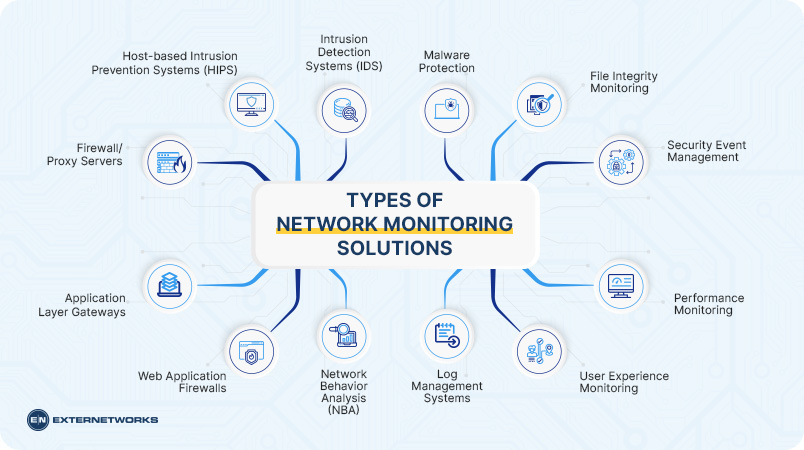
Network Monitoring solutions observe networks in real time. Reducing the time to detect problems is crucial to troubleshooting performance issues. You’ll also know about every performance issue on your network, especially those undetectable by network teams. You’ll also know about every performance issue. You should be aware of any performance issues that are dragging your network down.
The most common types of malware include viruses, spyware, adware, trojans, rootkits, dialers, keyloggers, worms, malicious browser extensions, and rogue security software. Malicious websites may try to trick users into downloading programs or opening files. These programs often contain harmful code that can damage your computer’s operating system, steal personal information, or allow hackers access to your bank account.
Network Monitoring provides visibility into your network, which allows you to identify potential threats before they happen. You can use this information to take action to mitigate any risks that may arise. For example, if there are signs that an attack is underway, you can shut down affected services until it’s safe to resume operations.
Network Monitoring helps detect intrusions in real-time. When a threat occurs, you can immediately react by taking steps to stop the malicious activity. Monitoring also enables you to identify the attack source to determine what steps need to be taken to protect against future incidents.
Downtime due to computer failure is costly and time-consuming. Using Network Monitoring technology can reduce downtime caused by computer failures. If a problem arises, you can quickly identify the cause, fix the issue, and get back up and running as soon as possible.
Network Monitoring improves efficiency and productivity by providing visibility into your business operations. You can easily see where resources are being used most efficiently with detailed reports. In addition, you can monitor your network 24/7 without manually checking each device.
Cybersecurity breaches have become more common than ever. Hackers target companies every day, looking for weak points to break through. By using Network Monitoring tools, you can identify any weaknesses in your network, making it harder for hackers to gain unauthorized access.
With Network Monitoring, you can gain better control of your network. You can view traffic on your network, track user activities, and even block specific IP addresses from accessing certain services.
Network Monitoring reduces operational costs by helping you detect problems before they occur. For example, if an employee accidentally deleted important files, you can immediately find out who did it and take action to prevent further damage.
Network Monitoring helps keep your data safe from malicious attacks. When a hacker gains unauthorized access to your network, he may attempt to steal valuable information. You need to ensure your network is up-to-date and secure. Network Monitoring software enables you to check your network.
Businesses should monitor a mix of performance, availability, capacity, and operational metrics to spot network problems before they cause major disruption. Key network health metrics include:
Monitoring these metrics together provides a more complete picture of network health. For example, high bandwidth utilization combined with increased latency and packet loss may indicate network congestion, while rising CPU utilization and error rates on a specific device may point to a hardware or configuration problem.
Network monitoring and network management are related but serve different purposes. Network monitoring focuses on observing network performance and health by tracking metrics such as uptime, latency, packet loss, bandwidth utilization, device status, and errors. It helps IT teams detect problems, generate alerts, and identify potential issues before they cause major disruptions.
Network management is broader and includes the actions taken to configure, maintain, optimize, and secure the network. This can include device configuration, software updates, performance optimization, access control, troubleshooting, capacity planning, and resolving incidents.
The two functions work together: monitoring identifies what is happening, while management decides what to do. For example, monitoring may detect high bandwidth utilization on a router and alert the IT team. At the same time, network management involves investigating the cause, adjusting configurations, upgrading capacity, or implementing other corrective measures.
In today’s world, cybersecurity is one of the biggest concerns for individuals and businesses. Cybercriminals are constantly developing new techniques to break through firewalls and other defenses. Network Monitoring is a powerful tool that can help you identify and address potential threats before affecting your business. Network Monitoring is essential for protecting your company from cyberattacks. Using Network Monitoring solutions can help prevent data theft, improve productivity, and save money.
See how ExterNetworks can help you with Managed NOC Services
Contact Us